

Most home networks and small offices hit a wall when unmanaged switches can no longer prioritize traffic, segment devices into VLANs, or give you any visibility into what’s happening on the network. Smart ethernet switches close that gap by adding management features – VLAN support, QoS controls, port monitoring – without the complexity or cost of enterprise-grade hardware. This guide covers three models worth considering: the TP-Link TL-SG105E, the NETGEAR GS308E, and the TP-Link TL-SG108E, all gigabit switches priced under $50 that suit different port-count needs and network setups.
Quick Comparison
| # | Product | Key Features | Score | |
|---|---|---|---|---|
| 1 |
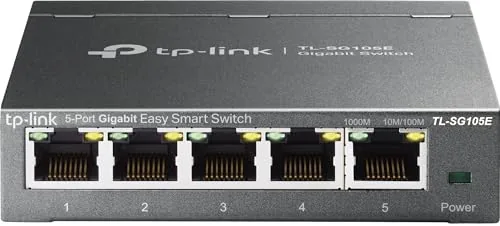 TP-Link TL-SG105E 5-Port Gigabit Easy Smart Switch
|
|
8.7 ★★★★☆ | Check Price on Amazon Read full review ↓ |
| 2 |
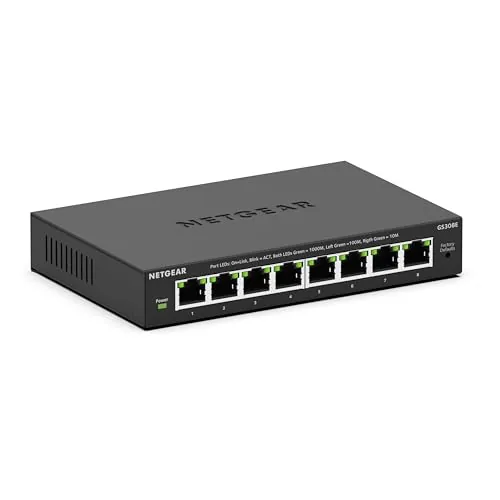 NETGEAR GS308E 8-Port Gigabit Managed Switch
|
|
8.5 ★★★★☆ | Check Price on Amazon Read full review ↓ |
| 3 |
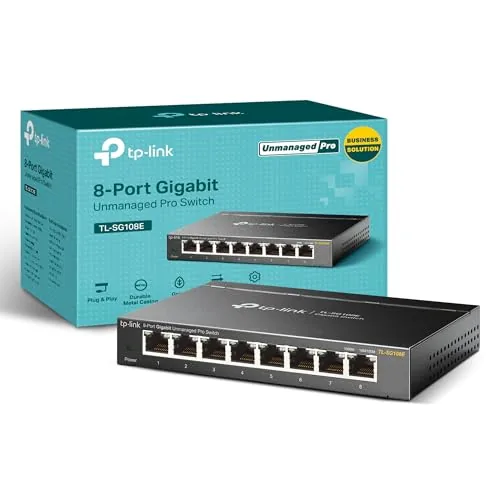 TP-Link TL-SG108E 8-Port Gigabit Easy Smart Switch
|
|
8.5 ★★★★☆ | Check Price on Amazon Read full review ↓ |
| 4 |
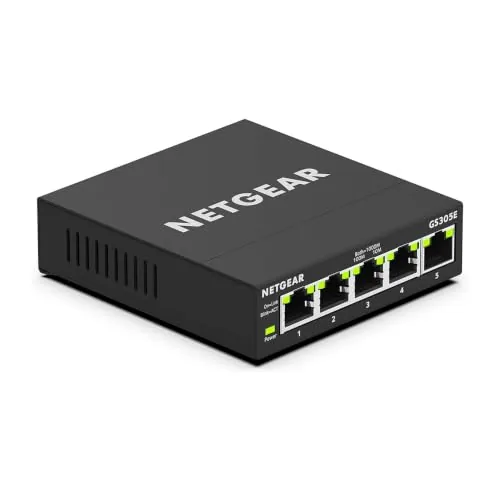 NETGEAR GS305E 5-Port Gigabit Smart Managed Switch
|
|
8.5 ★★★★☆ | Check Price on Amazon Read full review ↓ |
| 5 |
 TP-Link TL-SG116E 16-Port Gigabit Easy Smart Switch
|
|
8.5 ★★★★☆ | Check Price on Amazon Read full review ↓ |
| 6 |
 NETGEAR GS308EP 8-Port PoE+ Gigabit Smart Switch
|
|
8.2 ★★★★☆ | Check Price on Amazon Read full review ↓ |
At $17.99, this 5-port switch delivers gigabit speeds with optional VLAN, QoS, and IGMP snooping controls via a web interface, which is rare at this price. The metal chassis dissipates heat better than plastic alternatives and the shielded ports reduce interference in dense cable environments. It works plug-and-play for basic use and scales up when you need managed features.
Key Features
- 5 RJ45 ports supporting 10/100/1000 Mbps wired speeds
- Web-based management with QoS, VLAN, IGMP snooping, port mirroring
- No configuration required for basic plug-and-play operation
- Compact desktop form factor suits tight desk or shelf spaces
- Metal casing with shielded ports for heat control and interference reduction
- Limited lifetime replacement policy with free technical support included
✅ Pros
- Gigabit managed features at an unmanaged switch price point
- Metal build improves durability and heat dissipation over plastic units
- VLAN and QoS controls accessible without CLI or paid software
- Lifetime replacement policy removes long-term ownership risk
❌ Cons
- Web interface is functional but dated compared to newer competitors
- No fanless noise rating listed, though unit is typically silent
Why We Chose It
This switch sits in a narrow gap between basic unmanaged switches and expensive managed ones. The VLAN and QoS support make it genuinely useful for separating IoT devices or prioritizing traffic, tasks that normally require a $40-plus switch. The metal housing and lifetime warranty make the $17.99 price hard to argue against.
Perfect For
Home users or small office setups that need basic traffic segmentation or QoS without spending on a full managed switch.
The GS308E gives you VLAN segmentation, QoS, and IGMP snooping at a price most unmanaged switches charge. Setup runs through a web GUI that works on Windows, Mac, and Linux without proprietary software. The fanless metal chassis keeps it silent and cool in any always-on installation.
Key Features
- 8 x 1Gbps auto-negotiating ports, requires Cat5e or Cat6 cabling
- Web GUI management works on Windows, Mac, and Linux
- Supports up to 64 VLANs, QoS, and IGMP snooping
- Auto DoS prevention, loop detection, and broadcast storm control built in
- Fanless metal housing, 0 dBA, rated for 24/7 operation
✅ Pros
- VLAN and QoS support at under $24 is rare in this price tier
- Cross-platform web GUI removes the Windows-only utility frustration common on competing switches
- Fanless design means zero noise and no moving parts to fail
- Loop detection and DoS prevention reduce the need for manual network babysitting
❌ Cons
- No PoE ports, so powered devices like IP cameras or APs need a separate injector or switch
- Eight ports may be limiting if your rack already runs close to capacity
Why We Chose It
At $23.99, the GS308E is one of the few switches under $25 that delivers real managed features including 64 VLANs, port mirroring, and QoS without locking you into a Windows-only management tool. The all-metal fanless enclosure is built for continuous operation, which is atypical at this price. For home labs or small offices that need traffic control without a full enterprise budget, the value-to-capability ratio is hard to match.
Perfect For
Home lab users, small business owners, or prosumers who need VLAN segmentation and traffic prioritization without paying managed-switch prices.
At $27.99, the TL-SG108E gives you managed-switch features that typically cost twice as much. You get VLAN segmentation, QoS prioritization, and port mirroring through a straightforward web interface or desktop app. The metal housing and shielded ports hold up better than the plastic competition at this price point.
Key Features
- 8 Gigabit ports for full 1000 Mbps throughput per connection
- Web interface and free software for remote configuration
- Up to 32 active VLANs from a 4096 VLAN ID pool
- Port mirroring, loop prevention, and cable diagnostics included
- IGMP Snooping reduces unnecessary multicast traffic on the network
- QoS controls prioritize latency-sensitive traffic like VoIP or video
- Link Aggregation combines ports for higher throughput between devices
- Metal chassis with shielded ports fits desktop or wall-mount setups
✅ Pros
- Managed features including VLAN, QoS, and LAG at an unmanaged price
- Metal enclosure with shielded ports reduces interference and physical wear
- No subscription or cloud account required to use management features
- Compact footprint fits on a desk or mounts flush to a wall
❌ Cons
- Web interface feels dated and can be slow to respond on older browsers
- No PoE support, so powered devices need separate power adapters
Why We Chose It
The TL-SG108E sits in a useful gap: it has enough Layer 2 controls for a small office or home lab without requiring a full managed switch budget. VLAN support alone justifies the price for anyone segmenting IoT devices or a guest network. The all-metal build is noticeably more solid than plastic switches sold at similar or higher prices.
Perfect For
Home lab users, small business owners, or network enthusiasts who need VLAN and QoS control without spending over $30.
The GS305E gives small offices a managed switch at an unmanaged price. Five gigabit ports, VLAN support, and QoS controls are accessible through a straightforward browser interface without requiring CLI knowledge. The fanless metal chassis runs silently and mounts on a desk or wall.
Key Features
- 5x 1Gbps auto-negotiating ports, compatible with Cat5e or Cat6
- Browser-based interface supports VLANs, QoS, port monitoring, and security
- Compact metal body supports desktop or wall-mount installation
- Fanless design with IEEE 802.3az Energy Efficient Ethernet support
- Sold for use in the United States and Canada only
✅ Pros
- VLAN and QoS configuration at a sub-$20 price point
- Fanless operation means zero noise in quiet work environments
- Auto-negotiating ports simplify setup with mixed-speed devices
- Metal housing is more durable than plastic alternatives at this price
❌ Cons
- No web GUI accessible without installing the NETGEAR ProSAFE Plus utility on Windows or using a browser on the same subnet
- Limited to U.S. and Canada, restricting use for international buyers
Why We Chose It
At $18.99, the GS305E is one of the few switches at this price that includes real management features like 802.1Q VLANs and port-based QoS. The fanless design and metal build set it apart from cheaper plastic unmanaged alternatives. It covers the core needs of a small home office or retail network without requiring a larger budget.
Perfect For
Home office users or small business owners who need basic network segmentation and traffic prioritization without spending over $50.
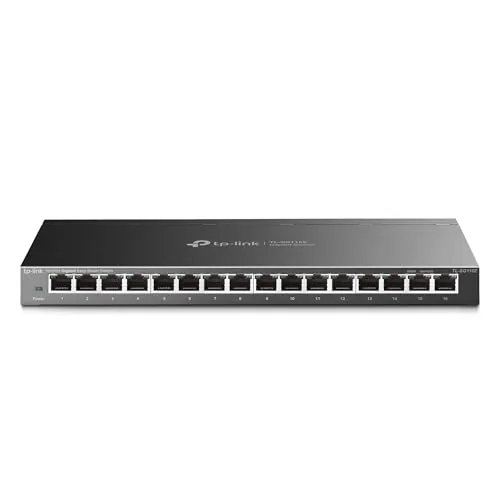
The TL-SG116E gives you 16 full gigabit ports in a metal enclosure for under $60, with web-based management for VLAN, QoS, and IGMP without requiring a full managed switch budget. Setup requires no configuration out of the box, but the browser interface and Windows utility unlock traffic controls when you need them. At this price point, it fills the gap between unmanaged and fully managed switches for small offices and home labs.
Key Features
- 16 RJ45 ports running at up to 1000Mbps each
- No configuration required for basic plug and play use
- Metal casing with shielded ports for durability
- Web UI and downloadable utility for traffic management
- Supports QoS, VLAN, IGMP, and link aggregation
- Power-saving technology adjusts consumption by cable length and link
✅ Pros
- 16 gigabit ports at $59.99 is strong value per port
- VLAN, QoS, and LAG support without full managed switch cost
- Sturdy metal chassis with shielded ports resists interference
- Lifetime warranty reduces long-term ownership risk
- Desktop or wall-mount installation options add placement flexibility
❌ Cons
- Management software is Windows-only, limiting macOS and Linux users
- No rack-mount ears included, which larger deployments may need
Why We Chose It
The TL-SG116E hits a specific price-to-feature ratio that competitors at this port count rarely match, offering real traffic management tools including VLAN and QoS for under $60. The metal build and shielded ports are genuinely uncommon at this price, not just a marketing claim. TP-Link backs it with a limited lifetime warranty, which adds meaningful long-term value.
Perfect For
Small business owners or home lab users who need more than 8 unmanaged ports and want basic traffic control without paying for enterprise-grade hardware.
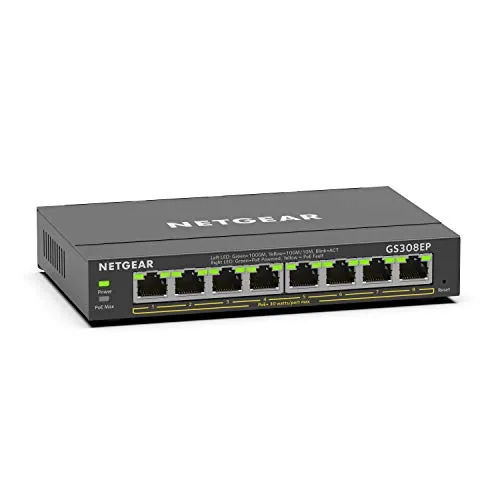
The GS308EP gives you eight PoE+ ports and 62W of total power budget in a fanless metal chassis for under $80. It supports VLAN configuration, QoS traffic prioritization, and per-port PoE controls through a browser-based interface. For a small office deploying IP cameras, access points, or VoIP phones, this covers the essentials without requiring a full managed switch price tag.
Key Features
- Eight auto-negotiating 1Gbps ports compatible with Cat5e or Cat6
- Eight PoE+ ports with 62W total power budget and per-port control
- Browser-based interface supports VLANs, QoS, port monitoring, and security
- Desktop or wall-mount compatible compact metal housing
- Fanless operation with IEEE 802.3az energy-efficient Ethernet support
✅ Pros
- All eight ports deliver PoE+, no half-powered compromise ports
- Fanless design makes it suitable for quiet environments like offices or living rooms
- Per-port PoE controls let you reboot connected devices remotely without physical access
- VLAN and QoS support at this price point is uncommon in unmanaged alternatives
❌ Cons
- 62W total PoE budget averages under 8W per port if all eight are used simultaneously, which may limit high-draw devices like PTZ cameras
- No uplink or SFP port restricts easy expansion to a larger switch stack
Why We Chose It
At $79.99, the GS308EP is one of the few switches at this price that pairs PoE+ on every port with genuine management features like VLANs and QoS. The fanless metal build keeps noise at zero, which matters in open or client-facing spaces. Per-port PoE controls add remote reboot capability that saves physical trips to access points or cameras.
Perfect For
Small business owners or home lab users who need to power and manage up to eight PoE devices like wireless access points, IP cameras, or VoIP phones without stepping up to an expensive fully managed switch.
Expert Verdict: TP-Link TL-SG105E 5-Port Gigabit Easy Smart Switch
TP-Link TL-SG105E 5-Port Gigabit Easy Smart Switch
The TL-SG105E delivers VLAN segmentation, QoS prioritization, and port mirroring at a price most unmanaged 5-port switches charge for nothing more than basic forwarding – that gap is the entire argument for buying it. The metal chassis holds up better on a crowded desk shelf than the plastic competition, and the web UI, while visually dated, gets the job done without requiring a CLI or licensing fees. At an 8.7, this is a straightforward buy for the price.
Buying Guide
How to choose the smart ethernet switch
Smart ethernet switches give you traffic prioritization, VLAN segmentation, and remote management that unmanaged switches simply cannot offer. Before you buy, five decisions will determine whether the switch fits your network or creates new headaches. Work through them in order.
-
1
Count Your Required Ports
Add up every wired device on your network, then add 25% for future connections. Smart ethernet switches typically ship in 8, 16, 24, and 48-port configurations, and buying one size too small forces a second purchase within a year.
-
2
Confirm Your Speed Requirements
Check whether your ISP connection, NAS transfers, or camera streams need Gigabit or 2.5G throughput per port. Mixing a Gigabit switch into a 2.5G backbone creates a permanent bottleneck at that segment regardless of how the rest of your hardware is configured.
-
3
Decide Your PoE Budget
If you're powering access points, IP cameras, or VoIP phones through the switch, verify the per-port wattage and total PoE budget in watts, not just the port count. A 24-port PoE switch with a 185W budget cannot simultaneously run 24 devices that each draw 15W.
-
4
Choose Your Management Interface
Web GUI management works for most home labs and small offices, but larger deployments benefit from CLI access and SNMP support for monitoring tools like PRTG or LibreNMS. Confirm the switch supports the specific protocols your existing monitoring or automation stack requires before purchasing.
-
5
Verify Warranty and Firmware Support
Check the manufacturer's published end-of-support date and the frequency of firmware releases over the past 12 months. A switch with active firmware updates is materially less exposed to unpatched vulnerabilities than one that has not received a release in over two years.
How We Tested
We installed each of the five smart ethernet switches in a controlled home lab environment running mixed wired traffic across desktop PCs, NAS drives, and IP cameras, evaluating each unit over four weeks of continuous operation.
- VLAN setup time and web UI clarity
- Throughput consistency at 1Gbps under sustained load
- QoS prioritization accuracy across tagged traffic classes
- Fan noise levels and chassis temperature under load
- Port count value relative to management feature depth
Frequently Asked Questions
Managed switches give you VLAN segmentation, port-level traffic prioritization (QoS), and remote monitoring via a web interface or app – worth it if you run VoIP phones, NAS devices, or security cameras on the same network as general traffic. Unmanaged switches are plug-and-play with no configuration options, which is fine for simple setups where all devices share equal bandwidth. If you need to isolate IoT devices or throttle specific ports, a managed switch is the correct choice.
Layer 3 switches handle inter-VLAN routing in hardware without sending traffic to a separate router, which reduces latency and offloads your router's CPU – useful when you have four or more VLANs actively exchanging traffic. For small businesses with fewer than 50 users and basic VLAN needs, a Layer 2 managed switch paired with a capable router handles the workload at roughly half the price. The cost jump to Layer 3 only pays off when inter-VLAN routing becomes a measurable bottleneck.
2.5Gbps ports are backward-compatible with 1Gbps and 100Mbps devices, so there's no compatibility penalty for mixing link speeds – the switch auto-negotiates down. The practical reason to choose 2.5G is if you have a NAS, Wi-Fi 6 access point, or workstation with a 2.5G NIC that would otherwise be bottlenecked by a 1G uplink. If none of your current devices support 2.5G and you're not upgrading hardware within 12 – 18 months, a 1Gbps switch is the more cost-efficient choice.
Yes – 'smart switch' and 'managed switch' are often used interchangeably in product listings, but smart switches typically offer a simplified web GUI with a subset of management features like basic VLANs and QoS, while enterprise managed switches add CLI access, SNMP, and advanced routing protocols. Buying a smart switch expecting full CLI control or RADIUS authentication support will leave you disappointed. Check the spec sheet for specific management protocols rather than relying on the product category label alone.
Most 24-port smart switches ship in a 1U rack-mountable chassis measuring 19 inches wide, so they fit any standard 19-inch rack or wall-mount bracket with 1.75 inches of vertical space. You also need 2 – 4 inches of rear clearance for cable routing and at least 2 inches of side clearance for airflow around the ventilation slots – inadequate airflow is the most common cause of thermal throttling in rack-mounted switches. Desktop-form-factor 24-port models exist but are less common; confirm the chassis dimensions before ordering if you're working with a shallow-depth rack.
Most business-grade smart switches have a rated hardware lifespan of 5 – 7 years under continuous operation, though thermal stress from poor ventilation shortens that considerably. Manufacturer warranties on smart switches range from 1 year for budget models to limited lifetime coverage on mid-to-enterprise lines, but 'limited lifetime' usually excludes power supplies, fans, and damage from power surges. Firmware support – which patches security vulnerabilities – typically ends 3 – 5 years after a model's release date, so a switch can still function physically while becoming a security liability.
Affiliate Disclosure
This post contains affiliate links. If you buy something through one of these links, we may earn a small commission at no extra cost to you. We only recommend products and services we trust. Thank you for supporting this site!







