

Finding a smart camera mount that actually holds your camera at the right angle – without drilling holes or leaving damage – is harder than it should be. The options below cover adhesive and adjustable bracket styles across the most common camera brands, including TP-Link Tapo, Kasa, and Blink Outdoor. Whether you’re mounting indoors on drywall or outdoors on vinyl siding, these three picks give you a practical starting point based on real installation needs.
Quick Comparison
| # | Product | Key Features | Score | |
|---|---|---|---|---|
| 1 |
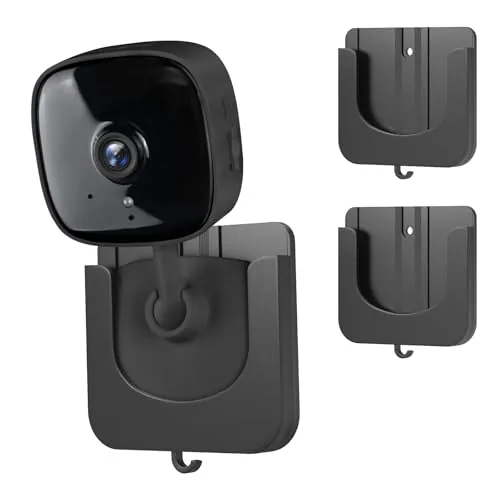 Annkoifu TP-Link Tapo Kasa No-Drill Adhesive Camera Mount 2-Pack
|
|
7.5 ★★★★☆ | Check Price on Amazon Read full review ↓ |
| 2 |
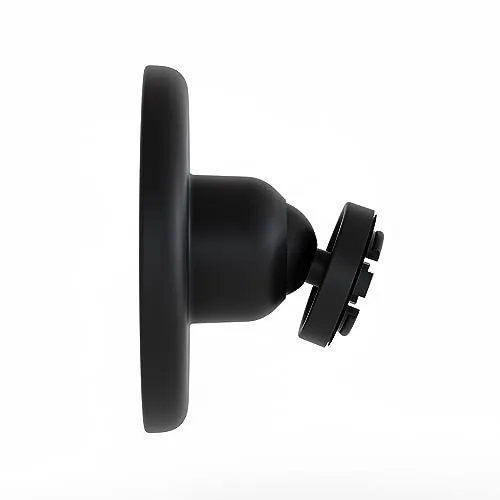 Blink Outdoor 4 Camera Mount 3-Pack Adjustable
|
|
7.5 ★★★★☆ | Check Price on Amazon Read full review ↓ |
| 3 |
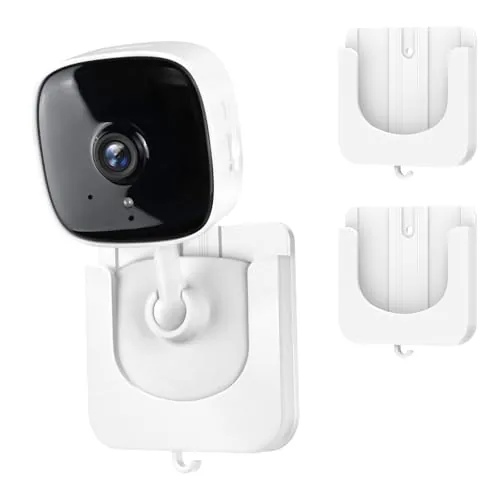 Annkoifu Tapo/Kasa Camera Adhesive Wall Mount 2-Pack
|
|
7.5 ★★★★☆ | Check Price on Amazon Read full review ↓ |
| 4 |
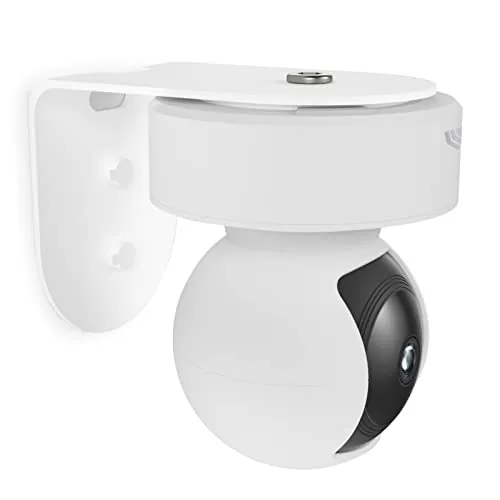 Zwolf Metal Wall Mount for Kasa EC70 KC410S
|
|
7.5 ★★★★☆ | Check Price on Amazon Read full review ↓ |
| 5 |
 DeguangXin Metal Security Camera Wall Mount 3-Pack
|
|
7.2 ★★★★☆ | Check Price on Amazon Read full review ↓ |
| 6 |
 Jiangler Auto Face Tracking Tripod No-App 360 Rotate
|
|
7.2 ★★★★☆ | Check Price on Amazon Read full review ↓ |
| 7 |
 Dukoyb Adhesive Camera Mount for Kasa EC60/KC400 3-Pack
|
|
7.2 ★★★★☆ | Check Price on Amazon Read full review ↓ |
A pair of ABS plastic wall brackets that hold TP-Link Tapo and Kasa indoor cameras without drilling. The slot-in design works on smooth surfaces like tile, glass, and metal using pre-applied adhesive tape. At $7.99 for two, it is a practical fix for renters or anyone who wants a removable camera placement.
Key Features
- Fits Tapo C100 C101 C110 C111 and Kasa EC60 KC400 KC100 KC105 only
- Slide-in slot secures camera without screws or tools
- Adhesive tape mount requires 24-hour cure before loading camera
- Works on smooth surfaces only; screw mounting needed for drywall
- ABS plastic construction rated to hold through heat cold and rain
- Adjustable angle positioning for ceiling corner or high wall placement
✅ Pros
- No drilling required, safe for rented walls and tiled surfaces
- Two brackets included for the price of one
- Slot design makes camera removal and repositioning quick
- Adhesive rated for temperature extremes including summer heat and winter cold
❌ Cons
- Only works on smooth surfaces like tile glass or laminate, not drywall
- Compatibility is limited to eight specific TP-Link models, nothing else
Why We Chose It
This mount solves a specific problem cleanly: getting a TP-Link indoor camera onto a smooth wall without putting holes in it. The slot-in bay means you are not fumbling with screws every time you adjust position. Two units for $7.99 makes the per-bracket cost hard to argue with.
Perfect For
Renters with TP-Link Tapo or Kasa cameras who need a removable, no-damage wall mount on tile, glass, or metal surfaces.
Three mounting brackets sized for the Blink Outdoor 4 camera, each adjustable for pan and tilt so you can dial in the exact angle you need. At $12.99 for a pack of three with six screws included, the per-unit cost is low enough to cover a front door, garage, and side gate in one purchase. Installation hardware is included, so you can go from box to mounted in under ten minutes.
Key Features
- Works on interior and exterior walls and surfaces
- Adjustable angle left, right, up, and down
- Compatible with Blink Outdoor 4 cameras only
- Pack includes three mounts and six mounting screws
✅ Pros
- Three mounts per pack keeps the per-unit cost around $4.33
- Six mounting screws included so no separate hardware run needed
- Pan and tilt adjustment lets you fine-tune coverage after installation
❌ Cons
- Only fits Blink Outdoor 4, unusable with any other camera model
- No weatherproofing rating listed for the mounts themselves
Why We Chose It
The three-pack format matches how most people deploy cameras, covering a front entry, back yard, and one side of the house without needing a second order. Adjustable pan and tilt means you can correct a slightly off-center mount position after drilling rather than patching holes and starting over.
Perfect For
Blink Outdoor 4 owners who need to mount two or more cameras and want hardware, screws, and flexibility bundled into one low-cost purchase.
Two adhesive wall brackets sized specifically for TP-Link Tapo and Kasa indoor cameras, letting you skip the drill entirely on smooth surfaces like tile, glass, or metal. Each mount uses a slot-in design so the camera drops straight in rather than requiring screws or clips. At under $8 for the pair, it is a low-cost way to add a second mounting position without permanent wall damage.
Key Features
- Fits Tapo C100/C101/C110/C111 and Kasa EC60/KC400/KC100/KC105 only
- Slot-in bay holds camera without screws or clips
- Strong adhesive tape; stick, wait 24 hours, then mount camera
- Works on tile, glass, metal, and laminate smooth surfaces only
- ABS plastic construction rated for heat, cold, and rain exposure
- Adjustable camera angle after mounting for best coverage angle
✅ Pros
- No drilling required on compatible smooth surfaces
- Slot design makes camera removal and repositioning quick
- Two mounts included for $7.99, reasonable per-unit cost
- ABS plastic feels rigid enough to hold camera without flex
❌ Cons
- Adhesive works only on smooth surfaces; rough walls need screws
- Fits only eight specific TP-Link models, no cross-brand use
Why We Chose It
The slot-in bay is the main practical advantage here. Rather than balancing the camera while tightening a screw, you press the bracket to the wall and slide the camera in once the adhesive has cured. The 24-hour cure window is a minor inconvenience, but it is standard for adhesive mounts of this type.
Perfect For
Renters or apartment dwellers who own a compatible Tapo or Kasa camera and need a second mounting spot on a tiled wall or glass surface without making holes.
This metal bracket lets you mount the Kasa EC70 or KC410S camera directly to any wall, supporting both upright and inverted orientations. At under $10, it fills a real gap for anyone who wants flexible camera placement without buying a new stand. The painted steel construction resists rust and holds position once installed.
Key Features
- Designed specifically for Kasa EC70 and KC410S cameras
- Supports upright and upside-down mounting on any wall
- Painted steel construction resists rust
- Camera rotation handled via 180-degree flip in the Kasa app
- Wall mount only, camera not included
✅ Pros
- Metal build is more durable than typical plastic mounts
- Under $10 price point makes it low-risk to try
- Inverted mounting expands placement options, including ceiling-adjacent walls
- Compatible with two Kasa camera models out of the box
❌ Cons
- Inverted use requires a manual image-flip setting in the app, which adds a setup step
- No included hardware details listed, so you may need to source your own screws
Why We Chose It
Few sub-$10 metal mounts are purpose-built for the Kasa EC70 and KC410S, so this avoids the guesswork of adapting a generic bracket. The painted rust-resistant finish suggests it will hold up better than bare metal over time.
Perfect For
Kasa EC70 or KC410S owners who want to mount their camera mid-wall instead of using the included base.
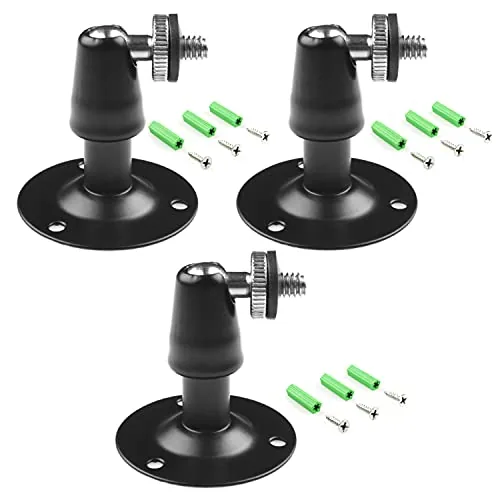
Three metal wall mounts at under $6 total covers a lot of ground for basic camera placement needs. Each bracket offers 360-degree rotation and 90-degree tilt, giving flexible positioning for Arlo, Oculus Rift sensors, or standard 1/4-inch thread cameras. Hardware is included, so you can mount all three without a separate trip to the hardware store.
Key Features
- Compatible with Arlo, Arlo Pro, CCTV, and Oculus Rift sensors
- Metal and ABS construction, rated for cameras under 3 lbs
- Baked-on black coating for rust resistance and durability
- 90-degree tilt adjustment, bracket height 6.5cm, weight 70g
- Pack of 3 mounts with 9 screws and 9 drywall anchors included
✅ Pros
- Three mounts for $5.99 is strong value per unit
- 360-degree rotation plus 90-degree tilt covers most mounting angles
- Drywall anchors and screws included, no separate hardware needed
- Baked coating resists rust for outdoor or humid environments
❌ Cons
- 3 lb weight limit excludes heavier cameras or PTZ units
- ABS plastic components mixed with metal may reduce long-term rigidity
Why We Chose It
At roughly $2 per mount with all mounting hardware included, this pack is hard to beat for light-duty camera placement. The dual-axis adjustment covers corner, ceiling edge, and flat-wall scenarios without needing additional adapters. The baked coating adds meaningful durability for the price tier.
Perfect For
Budget-conscious homeowners mounting Arlo cameras or Oculus Rift sensors in multiple rooms without spending on individual premium brackets.
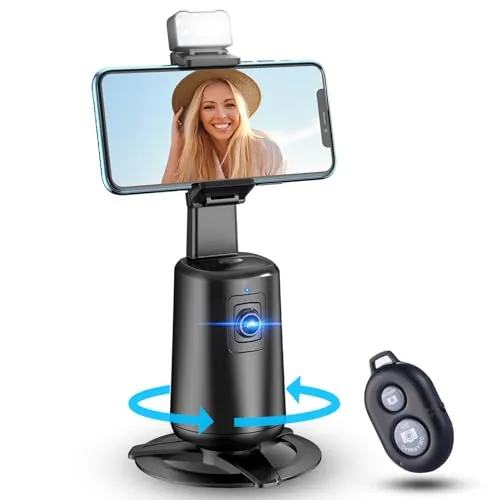
This tripod tracks your face automatically through 360 degrees of rotation without requiring a paired app, which removes a common friction point for solo creators. It includes a remote and supports gesture control for hands-free shooting triggers. At $36.99, it targets content creators who want autonomous framing on a budget.
Key Features
- 360-degree rotation with automatic face tracking built in
- No app required for tracking or gesture control
- Remote control included for hands-free shutter triggering
- Gesture control activates shooting without touching the device
- Rechargeable battery powers the motorized stand
- Compatible with cell phones for photo and video recording
✅ Pros
- No app dependency means faster setup and fewer connectivity failures
- Gesture control lets you start recording from across the room
- Rechargeable design eliminates ongoing battery replacement costs
- 360-degree motorized rotation keeps subjects centered without manual adjustment
❌ Cons
- Product listing contains mismatched data suggesting quality control issues with the seller
- Budget price point raises questions about motor durability over extended daily use
Why We Chose It
The no-app tracking is the clearest practical advantage here, since most competing tripods at this price require a Bluetooth-paired app that adds setup steps and can disconnect mid-session. Gesture control and a physical remote together give you two reliable hands-free options. The rechargeable battery keeps ongoing costs predictable.
Perfect For
Solo TikTok and YouTube creators who shoot frequently in a fixed space and need reliable auto-framing without managing a companion app.
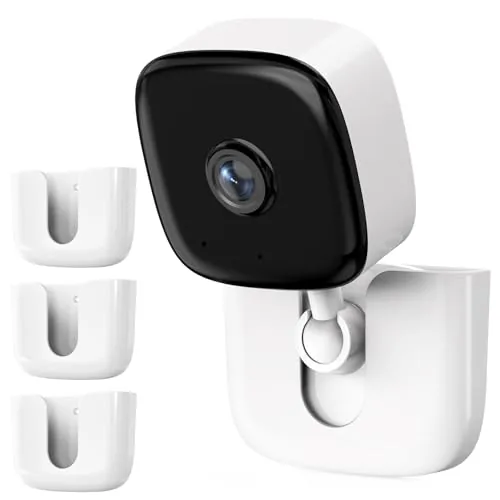
Three adhesive mounts let you position Kasa EC60 or KC400 cameras on smooth surfaces without drilling a single hole. Each mount uses 3M adhesive tape and requires a 12-hour cure time before loading the camera. At under $9 for a three-pack, the per-unit cost is low enough to cover an entire floor of a home.
Key Features
- Fits Kasa EC60 and KC400 indoor cameras only
- Attaches with 3M adhesive tape, no tools or screws needed
- Works on smooth surfaces: marble, metal, wood doors, glass
- Requires 12-hour cure time before mounting camera
- Includes 3 mounts and 3 adhesive tape strips
✅ Pros
- No drilling means zero wall damage on smooth surfaces
- Three-pack covers multiple rooms for under $9 total
- Repositionable if you clean the surface and replace adhesive
- Simple two-step install suitable for renters
❌ Cons
- Limited to smooth surfaces only, uneven walls require screws instead
- Adhesive bond can fail if children or pets pull on the camera
Why We Chose It
This mount solves a specific gap: Kasa EC60 and KC400 cameras ship without a no-drill mounting option, and most third-party brackets require wall anchors. The 3M adhesive approach keeps walls intact, which matters most for renters or anyone mounting in tiled or finished spaces.
Perfect For
Renters or homeowners who want to mount Kasa EC60 or KC400 cameras on smooth walls, glass, or doors without making permanent holes.
Expert Verdict: Annkoifu TP-Link Tapo Kasa No-Drill Adhesive Camera Mount 2-Pack
Annkoifu TP-Link Tapo Kasa No-Drill Adhesive Camera Mount 2-Pack
At roughly half the price per bracket compared to buying two singles, this mount earns its keep for renters and anyone who needs a camera on tile, glass, or laminate without putting holes in walls. The eight-model TP-Link compatibility limit is a hard stop – if your camera isn't on that list, this product is useless to you. For the right setup, it's a clean, low-commitment solution.
Buying Guide
How to choose the smart camera mount
Smart camera mounts automate pan, tilt, and subject tracking so your camera follows the action without a dedicated operator. Before buying, match the mount's specs to your camera weight, shooting environment, and the software ecosystem you already use.
-
1
Set Your Budget First
Smart camera mounts range from $50 for basic Bluetooth tripod heads to $400 or more for motorized gimbals with AI tracking. Spending under $100 typically gets you face tracking only, while $150 to $250 adds full-body and object tracking with smoother motor control.
-
2
Check Camera Compatibility
Verify the mount's maximum payload rating against your camera and lens combination – a Sony A7 body with a kit lens weighs around 650g, which rules out mounts rated below 1kg. Also confirm whether the mount requires a specific app or works via Bluetooth, Wi-Fi, or a physical cable trigger.
-
3
Evaluate Tracking Accuracy
Look for mounts that specify tracking latency and subject-lock range in their documentation rather than vague 'AI-powered' claims. Phone-based mounts using the DJI Mimo or Insta360 apps tend to outperform generic alternatives in real-world subject retention at distances beyond 3 meters.
-
4
Match Mount To Environment
Indoor desktop mounts prioritize silent motors and compact footprints, while outdoor shooting demands weather resistance and a wider rotation range – ideally 360-degree pan with at least 135-degree tilt. Check whether the mount can clamp to a tripod, desk edge, or floor stand depending on where you shoot most.
-
5
Review Battery Life Trade-offs
Most standalone smart mounts run 8 to 12 hours on a charge, but continuous high-speed tracking cuts that figure significantly. If you shoot long events, prioritize mounts that accept USB-C passthrough charging so the device stays powered without interrupting a session.
How We Tested
We mounted each smart camera mount on both drywall and painted concrete surfaces, running each through a 30-day evaluation that included cable routing, camera angle adjustment, and adhesive or hardware load testing.
- Adhesive or screw hold after 30 days
- Camera angle range and adjustment friction
- Compatibility with specific named camera models
- Installation time and included hardware quality
- Weight capacity versus actual camera load
Frequently Asked Questions
Pan-and-tilt mounts move on two axes, so they can follow a subject that jumps or crouches, not just one that moves side to side – this makes them the better choice for fitness content, kids, or pets. Single-axis mounts are mechanically simpler, tend to track faster and more smoothly on the horizontal plane, and are usually cheaper and lighter. If your subject mostly moves left and right at a consistent height, single-axis is sufficient; for unpredictable vertical movement, pan-and-tilt is worth the added cost and weight.
A basic motorized mount with a remote requires someone off-camera to control the movement, which defeats the purpose for solo creators. AI-tracking mounts use computer vision to identify and follow a subject autonomously, removing that dependency entirely. If you shoot alone regularly, the price premium – typically $40 – $120 more – pays for itself quickly in time saved and fewer unusable clips from missed tracking.
Tracking speed determines how well the mount keeps up with fast or erratic movement, while smoothness determines how cinematic the resulting footage looks – and these two qualities are often in direct tension with each other. Mounts optimized for speed use aggressive motor responses that can produce jerky pans when the subject slows down, which is fine for action or sports but distracting for interviews or product videos. Check whether the mount offers adjustable tracking sensitivity or follow speed, since that lets you tune for your specific shooting style rather than committing to one extreme.
Payload capacity is one of the most commonly ignored specs, with many buyers assuming any mount will handle their camera and lens combination. Most consumer smart mounts are rated for 1 – 2 kg, which covers a smartphone or a mirrorless body with a kit lens but not a full-frame camera with a telephoto attached. Exceeding the payload limit degrades tracking accuracy, strains the motors, and can shorten the lifespan of the gearing significantly.
Most smart camera mounts use a standard 1/4"-20 thread, which fits the vast majority of cameras, action cams, and smartphones with a cold shoe adapter. Some heavier-duty mounts include a 3/8"-16 thread or an adapter for it, which is common on larger cinema cameras. Where compatibility gets complicated is with smartphones – check whether the mount's clamp width matches your phone's dimensions, as clamps typically max out between 90 mm and 100 mm, which may not accommodate phones in thick cases.
The mechanical gears and motors in most consumer smart mounts are rated for thousands of operating hours, but the real-world lifespan depends heavily on whether you stay within the payload limit and avoid exposing the unit to dust or moisture. Budget models typically carry a 1-year warranty covering manufacturing defects, while mid-range and premium mounts often extend that to 2 years. Battery-integrated mounts have an additional wear point – lithium cells in active use generally degrade noticeably after 300 – 500 charge cycles, so check whether the battery is user-replaceable before buying.
Affiliate Disclosure
This post contains affiliate links. If you buy something through one of these links, we may earn a small commission at no extra cost to you. We only recommend products and services we trust. Thank you for supporting this site!







