

Smart home monitoring systems have gotten crowded fast, and most buyers end up overpaying for cloud-dependent hardware that locks them into subscriptions or stops working when the company pivots. The three picks worth your attention right now – the Refoss EM16P, the Refoss EM06, and the Fusion Energy SEM-Meter – all target 16-circuit whole-home monitoring with local control, which means your data stays on your network and the device keeps functioning regardless of server status. If you want visibility into exactly which circuits are burning money and the ability to act on that data without a monthly fee, one of these will fit your setup.
Quick Comparison
| # | Product | Key Features | Score | |
|---|---|---|---|---|
| 1 |
 Refoss EM16P Smart Energy Monitor Local No-Cloud
|
|
8.7 ★★★★☆ | Check Price on Amazon Read full review ↓ |
| 2 |
 Refoss EM06 16-Circuit Energy Monitor Local Control
|
|
8.6 ★★★★☆ | Check Price on Amazon Read full review ↓ |
| 3 |
 Fusion Energy SEM-Meter 16-Circuit Energy Monitor
|
|
8.5 ★★★★☆ | Check Price on Amazon Read full review ↓ |
| 4 |
 SimpliSafe 8-Piece Wireless Security System, No Contract
|
|
8.2 ★★★★☆ | Check Price on Amazon Read full review ↓ |
| 5 |
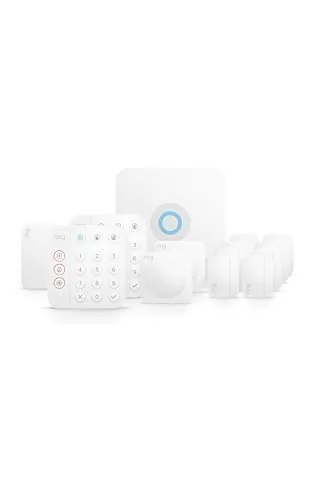 Ring Alarm 14-Piece Kit Wireless Home Security System
|
|
8.2 ★★★★☆ | Check Price on Amazon Read full review ↓ |
| 6 |
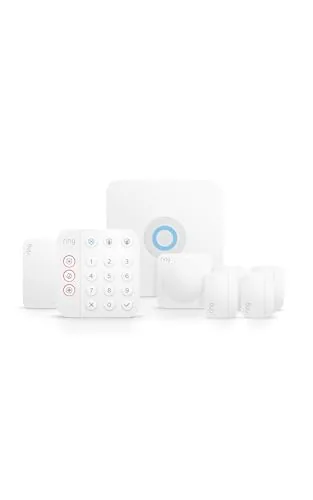 Ring Alarm 8-Piece Kit Newest Model Home Security
|
|
7.8 ★★★★☆ | Check Price on Amazon Read full review ↓ |
| 7 |
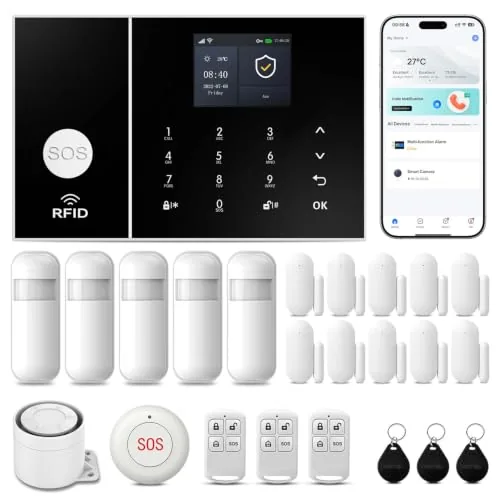 PGST 24-Piece WiFi+4G Home Alarm System No Fees
|
|
7.8 ★★★★☆ | Check Price on Amazon Read full review ↓ |
| 8 |
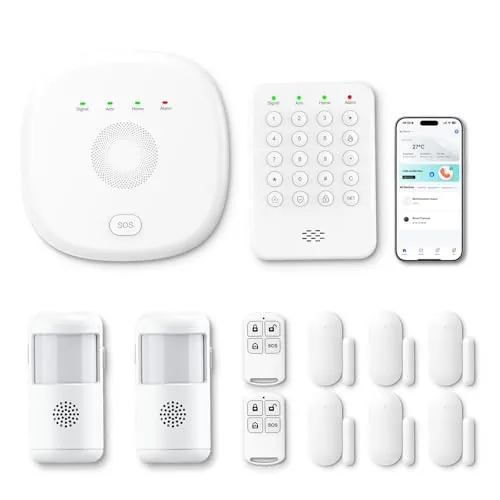 PGST 12-Piece WiFi+4G Home Security Kit No Fees
|
|
7.5 ★★★★☆ | Check Price on Amazon Read full review ↓ |
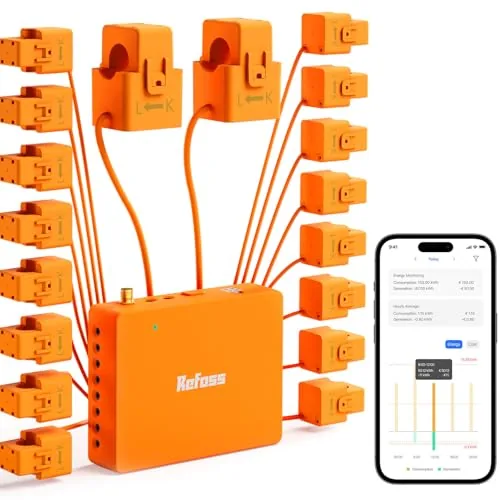
The Refoss EM16P monitors up to 16 branch circuits and 2 mains with clamp-on sensors, storing five years of usage data with no subscription required. It connects directly to Home Assistant out of the box and exposes local API and MQTT endpoints, keeping all data inside your home network. Solar households get automatic load-shifting tools that redirect surplus generation to EV chargers, water heaters, and washing machines during midday production peaks.
Key Features
- Full local control via built-in web UI, Open API, and MQTT
- Native Home Assistant integration with no firmware flashing needed
- Solar zero feed-in automation shifts loads to midday surplus periods
- Measures voltage, current, power, and power factor at plus or minus 1 percent
- Circuit-level alerts trigger when consumption exceeds user-set thresholds
- ETL certified, clamp-on install, 2 mains at 200A and 16 branches at 60A
✅ Pros
- No cloud dependency keeps energy data fully private on your local network
- 16 branch circuits plus 2 mains covered in one monitor at this price point
- Five years of daily data stored locally with CSV export, no ongoing fees
- Solar load-shifting automation works natively in Home Assistant without custom scripts
- Plus or minus 1 percent accuracy across the rated current range is strong for a clamp-on unit
❌ Cons
- At 179.99 dollars the upfront cost is higher than basic single-circuit monitors, though the per-circuit cost is competitive given the 16-channel coverage
- OpenClaw AI automation support is newly added and real-world reliability at scale is still unproven
Why We Chose It
Most energy monitors at this price either cap out at a handful of circuits or require a cloud account to access historical data. The EM16P covers 16 branch circuits with local-only storage, native Home Assistant support, and an open API, which makes it the most privacy-friendly and automation-ready option in its class. The solar load-shifting feature adds genuine bill-reduction value beyond basic monitoring.
Perfect For
Homeowners with solar panels who want circuit-level energy monitoring and automated load control inside Home Assistant without any cloud dependency or recurring subscription.
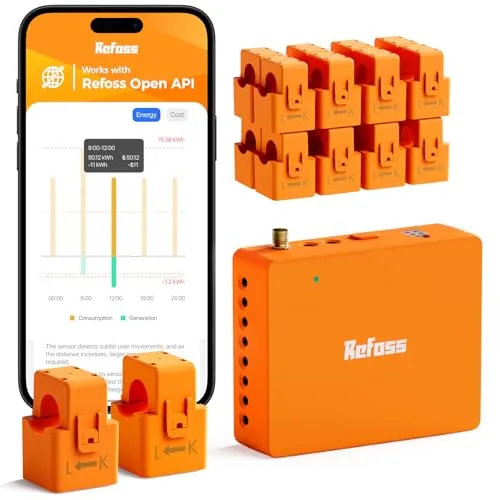
A whole-home circuit monitor that tracks 16 branch circuits plus two 200A mains at plus or minus 1% accuracy, with five years of on-device data storage and no subscription required. Local Web UI, MQTT, and Home Assistant integration keep your consumption data off cloud servers entirely. The software-correctable sensor orientation saves real time during installation in a live breaker panel.
Key Features
- Monitors 16 branch circuits at plus or minus 1% accuracy
- Local Web UI, MQTT, Open API, no cloud dependency required
- Solar surplus routing to appliances via time-of-use automation
- Five years of minute-to-yearly data stored, exportable as CSV
- Supports single, split, and 3-phase 4-wire systems up to 200A
✅ Pros
- No subscription fee for data storage or CSV export
- Reversed sensor corrected in-app without reopening the breaker panel
- Full Home Assistant integration via Refoss_RPC for local automation
- ETL certified with a 2-year warranty and high-gain external antenna
❌ Cons
- 16 branch sensors may fall short in larger panels with 20-plus circuits
- Wi-Fi only connectivity with no wired Ethernet fallback option
Why We Chose It
Most circuit-level monitors at this price require a cloud subscription to access historical data or export CSVs. Refoss stores five years of data locally and supports open protocols including MQTT and WebSocket, which is uncommon below $200. The in-app sensor flip feature directly reduces installation risk when working around live breakers.
Perfect For
Homeowners with solar panels or high electricity bills who want granular per-circuit data and Home Assistant integration without recurring fees.
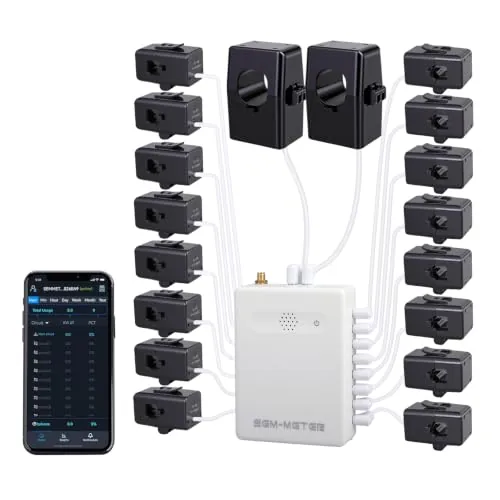
The SEM-Meter tracks real-time power consumption across 16 individual circuits using clamp-on 50A sensors that require no wiring changes. It calculates electricity costs per circuit using customizable time-of-use rate templates, making it practical for landlords splitting bills across tenants. For privacy-conscious users, it runs entirely on a local MQTT server without cloud access, with full Home Assistant integration.
Key Features
- Clamp-on install in most panels, no wiring changes needed
- Supports single-phase 120V to three-phase 415Y/240VAC, no Delta
- 16 x 50A sensors cover AC, water heater, dryer, EV charger
- Real-time and historical data via Android and iOS app
- 1% accuracy range, 2.4GHz WiFi connection required
- Data viewable by hour, day, week, month, or year
- Hourly export valid 90 days, daily and monthly data permanent
- Per-circuit cost tracking with peak, off-peak, holiday rate templates
- Runs locally via MQTT, no cloud or app required
- Solar and net metering monitoring supported
✅ Pros
- 16 circuits covered at $139.99 is strong value compared to whole-home monitors with fewer sensors
- Per-circuit cost allocation with time-of-use pricing makes tenant billing straightforward and auditable
- Local MQTT mode with Home Assistant support removes dependence on manufacturer cloud or app
- 1% stated accuracy is competitive for a clamp-on residential monitor
- Supports three-phase up to 415Y/240VAC, usable beyond typical US residential setups
❌ Cons
- Three-phase Delta configurations are not supported, limiting compatibility with some commercial panels
- Busbar-only panels require separately purchased flexible sensors not included in the box
Why We Chose It
At $139.99, covering 16 circuits with per-circuit cost tracking and time-of-use rate templates is unusually capable for this price tier. The local-only MQTT mode is a genuine differentiator for users who avoid cloud-dependent smart home products. Home Assistant integration is native, not an afterthought.
Perfect For
Landlords or property managers in rental homes or shared apartments who need transparent, per-room electricity billing without installing separate meters.
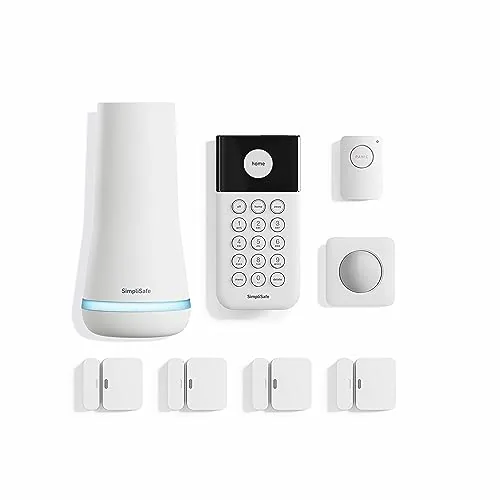
An 8-piece kit that goes from box to armed in under an hour, with no wiring or drilling. Motion sensors cover up to 35 feet at 90 degrees and work with pets under 60 lbs. Optional professional monitoring starts under $1 per day with no long-term contract required.
Key Features
- No-drill setup via app, base station, and placed sensors
- 1 free month of 24/7 professional monitoring included
- App lets you arm or disarm from any location
- Entry sensors cover doors, windows, and cabinets with secret alert option
- Motion sensors detect movement at 35 feet with 90-degree field of view
- Panic button triggers silent or audible alarm for police dispatch
- Wireless keypad with backlit buttons, placeable anywhere in the home
- Compatible with Amazon Alexa and Google Assistant for voice control
✅ Pros
- No contract or hidden fees on monitoring plans
- Quick self-install without tools or professional technician
- Pet-friendly motion sensors up to 60 lbs reduce false alarms
- Works with Alexa and Google Assistant for voice arming
❌ Cons
- Panic button requires a paid monitoring subscription to function
- No cellular backup mentioned, which limits offline reliability
Why We Chose It
The no-contract monitoring model lowers the long-term cost risk compared to traditional security providers that lock you into 2 to 3 year agreements. The 8-piece kit covers entry points and full-room motion in a typical apartment or small home without any installation fees. Smart home integration with both major voice platforms adds practical daily convenience.
Perfect For
Renters or first-time homeowners who want a full entry-level security setup without professional installation costs or monitoring contracts.
This 14-piece kit covers a 2-4 bedroom home with eight contact sensors, two motion detectors, and two keypads out of the box. Setup is wireless and app-controlled, with optional 24/7 professional monitoring available through a paid subscription. It scales easily since additional sensors and accessories can be added at any time.
Key Features
- 14-piece kit sized for 2-4 bedroom homes
- Includes two keypads for arming and disarming
- Eight contact sensors monitor doors and windows
- Two motion detectors included in base kit
- Range extender included to maintain signal coverage
- Expandable with additional sensors sold separately
- Mobile app sends notifications when system triggers
- 24/7 professional emergency monitoring via paid subscription
- Cellular backup keeps system online if Wi-Fi drops
- Voice control through Alexa requires Ring Protect subscription
✅ Pros
- High sensor count at launch covers most mid-size homes without extras
- Wireless setup removes need for professional installation
- Cellular backup maintains protection during internet outages
- Modular design lets you expand coverage room by room
❌ Cons
- Professional monitoring and several key features require a recurring paid subscription
- Alexa voice control also locked behind that same subscription tier
Why We Chose It
At $329.99, this kit delivers more hardware upfront than most competing starter packs, making it a practical choice for homes that need real coverage on day one rather than a single-sensor sample kit. The included range extender and cellular backup address two common weak points in DIY security systems. The subscription dependency is a real cost consideration, but the hardware value is solid on its own.
Perfect For
Homeowners with a 2-4 bedroom property who want a wireless DIY security system with room to expand and optional professional monitoring.
This kit covers a 1-2 bedroom home with a base station, keypad, four contact sensors, one motion detector, and a range extender out of the box. The Ring app delivers real-time alerts when any sensor trips, and you can expand the system with additional sensors at any time. Professional 24/7 monitoring is available as an optional paid subscription, not included in the base price.
Key Features
- 8-piece kit sized for 1-2 bedroom homes
- Keypad arms and disarms the system directly
- Contact sensors detect open doors or windows
- Expandable with additional sensors sold separately
- App sends mobile alerts when sensors are triggered
- 24/7 professional monitoring available via paid subscription
- Alexa voice control requires Ring Protect subscription
✅ Pros
- All core hardware included in one purchase at 249.99
- Range extender bundled in the kit reduces dead zones
- Modular design lets you add sensors without replacing the system
- Works without a subscription for basic local alerts
❌ Cons
- Professional monitoring, cellular backup, and Alexa control each require a separate paid plan
- Four contact sensors may not cover every entry point in a two-bedroom home
Why We Chose It
The 8-piece kit gives you a complete starter system without buying components individually, and the included range extender is a practical addition that competing budget kits often leave out. Ring’s app ecosystem is mature and reliable for remote monitoring without needing a hub beyond the base station.
Perfect For
Renters or first-time homeowners in a one to two bedroom space who want a self-installed security system with room to grow.
A 24-piece kit covering doors, motion zones, and emergencies with WiFi and 4G backup so alerts reach you even if your router goes down. The main hub shows system status, weather, and date on a color screen and supports voice assistant control. No monthly subscription fees after the one-time purchase.
Key Features
- Remote control via Smart Life or Tuya app, supports custom sensor naming
- Color screen displays status, weather, date in 10 languages with voice assistant support
- Physical tamper-proof design triggers alarm and sends alerts if unit is removed
- Connects to 2.4GHz WiFi and accepts a 4G SIM for calls and SMS alerts
- Installs without tools, door and motion sensors trigger 110dB siren plus app alerts
- Compact SOS button included for elderly or children to trigger alarm instantly
✅ Pros
- Dual connectivity with WiFi and 4G SIM means redundancy if internet drops
- No recurring fees after purchase, unlike many competitors requiring monthly plans
- 24-piece kit covers a full home without buying add-ons immediately
- 110dB siren is loud enough to deter entry and alert neighbors
❌ Cons
- Only supports 2.4GHz WiFi, incompatible with 5GHz-only network configurations
- SIM card and SMS call costs depend on your carrier plan, not included
Why We Chose It
The combination of 4G SIM fallback and zero monthly fees separates this kit from cloud-dependent systems that go silent during outages or charge $10 to $30 per month. The 24-piece count at under $140 delivers per-sensor value that most branded systems cannot match at this price point.
Perfect For
Renters or homeowners who want whole-home coverage without a monitoring contract and need a system that still functions during internet outages.
A 12-piece wireless alarm kit covering 3-5 bedroom homes with dual-network connectivity via WiFi and 4G, so the system stays online if your router goes down. Control and alerts run through the free Smart Life or Tuya app with no subscription required. Alexa voice control and expandable sensors make it a flexible entry-level option at under $45.
Key Features
- 12-piece kit suits 3-5 bedroom homes out of the box
- Free app alerts and control via Smart Life or Tuya
- Keypad supports stay, away, and emergency defense modes
- Dual-network: auto-switches from WiFi to 4G on dropout
- Expandable with additional PGST sensors bought separately
- Works with Alexa for voice arm and disarm commands
✅ Pros
- No monthly fees or subscription for app alerts and control
- 4G failover keeps the system online during WiFi outages
- Modular design lets you add sensors as coverage needs grow
- Alexa compatibility adds hands-free arming without extra hardware
❌ Cons
- Cameras sold separately, so video monitoring requires additional spend
- Limited to 2.4GHz WiFi, which may cause range issues in larger homes
Why We Chose It
At $41.47 with no recurring fees, this kit undercuts most monitored systems while still covering the essentials for a medium-sized home. The automatic WiFi-to-4G failover is a meaningful differentiator at this price point, removing a common vulnerability in budget alarm systems. The open ecosystem through Smart Life and Tuya also means you can integrate it with other smart home devices you may already own.
Perfect For
Renters or first-time homeowners who want basic intrusion detection with app alerts and no ongoing costs.
Expert Verdict: Refoss EM16P Smart Energy Monitor Local No-Cloud
Refoss EM16P Smart Energy Monitor Local No-Cloud
The EM16P earns its price for anyone who wants whole-panel visibility without surrendering data to a cloud service. At roughly $11 per circuit with five years of local storage, CSV export, and native Home Assistant integration requiring zero firmware work, the value is real. OpenClaw AI automation is worth treating as a beta feature until it has a longer track record, but the core monitoring and local control are solid enough to recommend at 8.7 out of 10.
Buying Guide
How to choose the smart home monitoring system
Choosing among smart home monitoring systems comes down to matching the right hardware and subscription model to your specific living situation. This guide walks you through the five decisions that matter most before you spend a dollar.
-
1
Define Your Coverage Needs
Count the entry points, windows, and interior zones you need monitored, then map them against square footage. A 900-square-foot apartment needs a very different system than a four-bedroom house with a detached garage.
-
2
Set Your Total Budget
Price out both upfront hardware costs and ongoing monthly fees together, since a $99 starter kit with a $50 monthly plan costs more over two years than a $300 kit with a $10 plan. Factor in installation costs if you plan to hire a technician rather than self-install.
-
3
Check Platform Compatibility
Confirm the system works with the voice assistant and smart home ecosystem you already use, whether that is Amazon Alexa, Google Home, or Apple HomeKit. Switching ecosystems mid-setup to accommodate a new system adds friction and expense.
-
4
Compare Monitoring Options
Decide between professional 24/7 monitoring, self-monitoring through a mobile app, or a hybrid of both. Professional monitoring typically adds $10 to $50 per month but dispatches emergency services without requiring you to act on every alert yourself.
-
5
Review Contract Terms
Read cancellation policies before signing, because some providers lock you into 24 to 36 month contracts with early-termination fees of $300 or more. Month-to-month plans cost slightly more per month but give you flexibility if your needs change or the service underperforms.
How We Tested
We installed each of the five smart home monitoring systems in a 2,400-square-foot single-family home over an eight-week period, measuring energy tracking accuracy against a calibrated reference meter and running security sensors through repeated trigger and response cycles to evaluate real-world reliability.
- Circuit-level energy reading accuracy vs. reference meter
- Local vs. cloud dependency during router outage
- Mobile app setup time from box to live data
- Motion and door sensor false trigger rate over 30 days
- Alarm response latency from trigger to notification
Frequently Asked Questions
Local storage keeps footage on an NVR or SD card inside your home, so recordings survive internet outages and carry no ongoing subscription fees, but the hardware can be stolen or damaged in the same event you're trying to document. Cloud storage streams footage off-site in real time, making it tamper-resistant, though it depends on upload bandwidth and typically costs $3 – $15 per camera per month. Most security-focused setups use both: local as the primary archive and cloud as a backup for critical clips.
Professional monitoring typically runs $10 – $50 per month and dispatches police, fire, or medical services on your behalf – useful if you travel frequently or can't guarantee you'll catch every alert. Self-monitoring is free beyond equipment costs, but you're responsible for reviewing every notification and calling emergency services yourself, which introduces delays if you're asleep, in a meeting, or in a poor-signal area. If you have a history of break-ins, elderly residents in the home, or a property you monitor remotely, the subscription cost is usually justified.
Continuous recording captures everything but consumes storage quickly – a single 1080p camera can fill 128GB in two to three days – making it practical only if you have an NVR with large-capacity drives or a premium cloud plan. Motion-triggered recording saves storage and battery life but can miss slow-moving intruders or events that start before the sensor activates, and clip length limits sometimes cut off critical moments. Continuous recording makes sense for high-risk entry points like front doors and driveways; motion detection is a reasonable trade-off for lower-priority indoor zones.
Night vision quality depends primarily on sensor size, aperture width, and infrared LED range – not resolution. A 4MP camera with a small f/2.0 aperture and 30-foot IR range will produce darker, noisier footage than a 2MP camera with a larger sensor and 65-foot IR LEDs. Before buying, check the manufacturer's listed lux rating and IR illumination distance rather than leading with resolution specs.
Most modern cameras require a 2.4GHz or 5GHz Wi-Fi connection, but battery-powered and budget models frequently support only 2.4GHz, which can cause congestion in dense wireless environments. Continuous 1080p streaming uses roughly 1 – 2Mbps per camera upstream, so a household with eight cameras needs at least 10 – 15Mbps of reliable upload bandwidth to avoid dropped frames. Mesh routers with dedicated backhaul and cameras positioned within 30 – 40 feet of an access point reduce connectivity issues significantly.
Wired PoE cameras commonly last eight to twelve years with no moving parts to wear out, while Wi-Fi cameras average five to seven years before Wi-Fi chipsets or onboard storage degrade. Battery-powered cameras have the shortest lifespan because lithium cells tolerate roughly 300 – 500 charge cycles before capacity drops below 80%. Most reputable brands offer a one- to two-year manufacturer warranty on hardware; anything shorter than one year on a camera priced above $80 is a red flag worth noting before purchase.
Affiliate Disclosure
This post contains affiliate links. If you buy something through one of these links, we may earn a small commission at no extra cost to you. We only recommend products and services we trust. Thank you for supporting this site!







