

Smart home remote controls have moved well past the single-device clicker, and the current market splits into three distinct categories worth understanding before you spend anything: universal remotes that consolidate your entertainment setup, Wi-Fi controllers that extend control to garage doors and appliances, and hub-based systems that tie dozens of devices into one interface. The SofaBaton U3, eKyro Garage Door Opener, and SwitchBot Hub Mini each represent one of those categories, and choosing the wrong one means paying for features your setup can’t use. This review breaks down exactly what each does, where it falls short, and which buyer it actually fits.
Quick Comparison
| # | Product | Key Features | Score | |
|---|---|---|---|---|
| 1 |
 SofaBaton U3 Universal Remote with Air Mouse & LCD
|
|
8.2 ★★★★☆ | Check Price on Amazon Read full review ↓ |
| 2 |
 eKyro Smart Garage Door Opener WiFi Controller
|
|
8.2 ★★★★☆ | Check Price on Amazon Read full review ↓ |
| 3 |
 SwitchBot Universal Remote Hub Mini Matter 25-Device
|
|
7.8 ★★★★☆ | Check Price on Amazon Read full review ↓ |
| 4 |
 Amazon Basics Smart Dimmer Switch Remote Alexa-Only
|
|
7.5 ★★★★☆ | Check Price on Amazon Read full review ↓ |
| 5 |
 Philips WiZ Smart Lighting Remote, Wi-Fi-Free Control
|
|
7.5 ★★★★☆ | Check Price on Amazon Read full review ↓ |
| 6 |
 MOES WiFi Smart IR Blaster No Hub Required
|
|
7.5 ★★★★☆ | Check Price on Amazon Read full review ↓ |
| 7 |
 GoveeLife 6-Button Smart Sensor for Group Device Control
|
|
6.8 ★★★☆☆ | Check Price on Amazon Read full review ↓ |
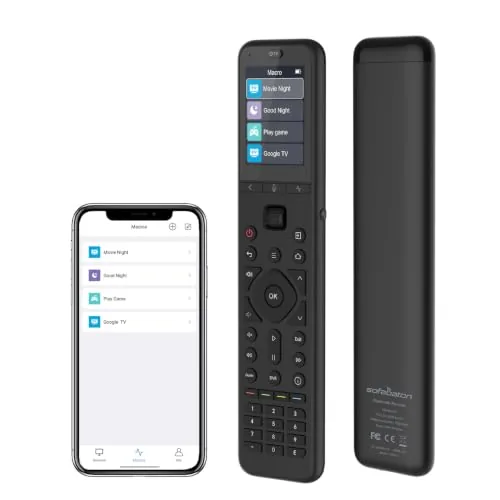
The U3 controls IR, Bluetooth, and RF devices from a single rechargeable remote with a 2.4-inch LCD screen. A scroll wheel, air mouse mode, and Google Assistant voice control reduce how often you reach for multiple remotes. Fully remappable buttons and one-touch macros let you tailor it to your exact setup.
Key Features
- Pairs with up to 3 Bluetooth devices, switches instantly without re-pairing
- Google Assistant voice control for search, channels, and volume
- App-based button remapping and one-touch macro sequences
- Air mouse mode projects a cursor on Android or Google TV screens
- 2.4-inch LCD with 3 brightness levels and two wake-up options
- Strong IR output, compatible with separately sold R1 IR repeater
- USB-C rechargeable with backlit buttons for low-light use
✅ Pros
- Handles IR, Bluetooth, and RF devices without needing separate remotes
- Air mouse cursor control is practical for Android TV and projector navigation
- USB-C charging and backlit keys add everyday convenience
- Macro button surfaces preset sequences from the home screen immediately
❌ Cons
- IR repeater for whole-home control requires an additional purchase
- Bluetooth pairing limited to 3 devices, which may not cover larger setups
Why We Chose It
The U3 combines air mouse functionality, a physical LCD screen, and full button remapping in a single rechargeable remote, which is uncommon at this price tier. The macro system and Google Assistant integration reduce the steps needed to launch or control content. At $129.99 it costs more than basic universals, but the feature set justifies the gap for mixed-device home theater setups.
Perfect For
Home theater users running a mix of IR and Bluetooth devices who want one rechargeable remote with voice control and cursor navigation.
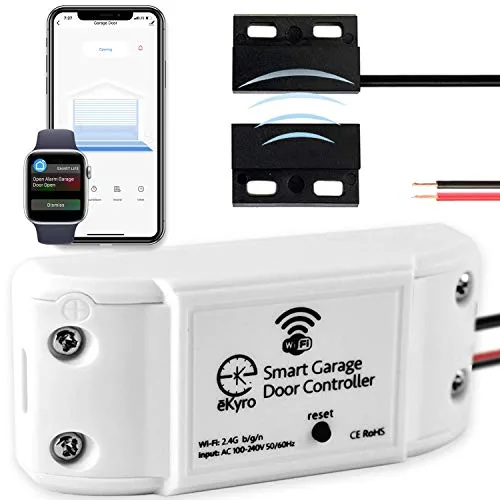
A $34.99 retrofit that adds WiFi control and voice assistant support to most existing garage door openers. You get real-time open/close alerts, remote access from anywhere with cell service, and scheduling without a monthly subscription. Compatible with Alexa, Google Home, and Siri out of the box.
Key Features
- Connects to existing openers via WiFi for remote smartphone control
- Works with Alexa, Google Home, Siri, and Android smartwatches
- Compatible with most opener brands; adapter available for edge cases
- Multiple units can be paired for homes with more than one door
- No monthly fees for core features including scheduling and auto-close
✅ Pros
- No subscription fee for core features including scheduling and auto-close
- Broad voice assistant compatibility across Alexa, Google Home, and Siri
- Door-left-open alerts add practical security value for daily use
- Multi-door households can run multiple units paired in one app
❌ Cons
- Ryobi garage door openers are explicitly incompatible with no workaround
- Some opener models may require a separate adapter, adding friction to setup
Why We Chose It
At $34.99 with no recurring fees, this undercuts most smart garage solutions that charge $3 to $5 per month for the same alert and scheduling features. The adapter program means compatibility gaps rarely become dead ends. Voice control across all three major assistants is a genuine convenience for mixed-device households.
Perfect For
Homeowners who want smartphone and voice control for an existing garage opener without paying monthly fees or replacing hardware.
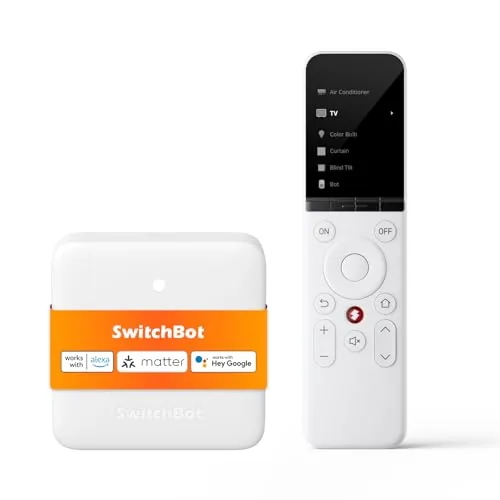
A physical universal remote that consolidates up to 25 IR and Bluetooth devices into one rechargeable handset, with a 2000mAh battery rated for 150 days per charge. Setup takes around 10 minutes using a library of nearly 100,000 appliance codes. Matter support via SwitchBot Hub Mini unlocks Apple Home integration for IR appliances alongside third-party smart home devices.
Key Features
- Supports 10 IR and 15 Bluetooth devices up to 25 total
- IR compatibility covers TVs, ACs, fans, projectors, and soundbars
- Bluetooth pairs with Apple TV, Fire TV, and Nvidia Shield directly
- Matter support requires SwitchBot Hub Mini or Hub 2 separately
- Apple Home integration only, no Google Home or Alexa Matter support
- IR code library covers nearly 100,000 models with key-by-key learning
- 19 buttons plus touch wheel, sized for elderly and children
- 2000mAh battery lasts up to 150 days per charge
- Buttons rated for 100,000 presses, 1-year warranty with free replacement
✅ Pros
- 150-day battery life eliminates frequent recharging
- Consolidates IR and Bluetooth control into one physical remote
- Large IR code library with manual learning fallback for unlisted devices
- 19-button layout with touch wheel is accessible for older users
- Matter integration adds Apple Home control for IR appliances without separate apps
❌ Cons
- Matter and Apple Home features require purchasing a SwitchBot Hub Mini separately, adding cost
- No RF remote support and very limited third-party Bluetooth device compatibility
Why We Chose It
The 150-day battery life and broad IR code library address the two most common complaints about universal remotes: dead batteries and missing device codes. Apple Home integration via Matter is a genuine differentiator for households already using HomeKit, letting IR appliances sit alongside native smart home devices in the same app and automations.
Perfect For
Homeowners who want a single rechargeable remote for a mixed IR and Apple TV setup and already use or plan to use SwitchBot Hub Mini for HomeKit control.
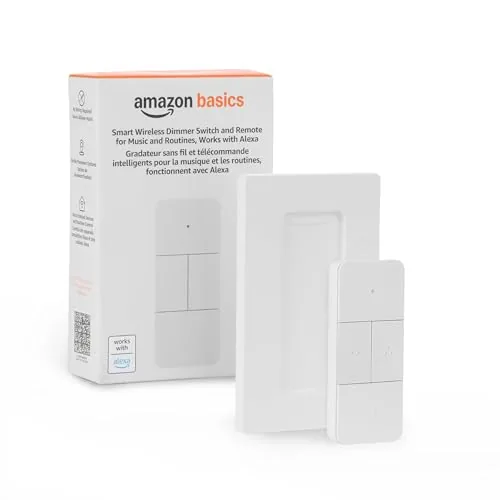
A battery-powered handheld remote that controls Alexa-compatible smart home devices without voice commands or wall mounting. At $19.99 it fills a real gap for households that want physical button control over lights, music, blinds, and thermostats. Setup runs through the Alexa app and requires an Echo device as the hub.
Key Features
- Controls lights, music, blinds, locks, fans, and thermostats
- Trigger automations across multiple Alexa devices simultaneously
- Battery-powered, portable, usable from anywhere in the home
- Pairs via Echo device acting as the smart home hub
- Setup completed through Alexa app after removing battery tab
✅ Pros
- $19.99 price point is low for a multi-function smart remote
- No wiring or wall mounting needed, genuinely portable
- Controls a wide range of device categories beyond just lighting
- Physical buttons useful when voice control is inconvenient
❌ Cons
- Requires an Echo device as a hub, adds a dependency cost
- Limited to the Alexa ecosystem with no Google Home or HomeKit support
Why We Chose It
The combination of portability and broad device compatibility at under $20 makes this a practical add-on for existing Alexa households. It solves the specific problem of controlling smart devices from bed, a couch, or a room without an Echo speaker nearby. The guided Alexa app setup keeps the barrier to entry low.
Perfect For
Alexa households that want physical button control over smart devices without voice commands or installing additional wall hardware.
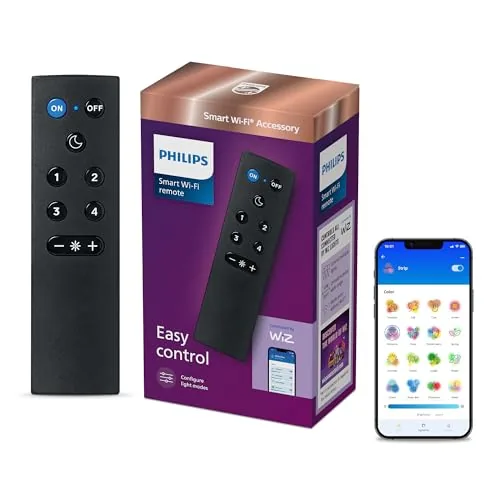
A nine-button physical remote for WiZ smart lights that works even when your Wi-Fi is down, sending signals directly to bulbs and devices. The four numbered buttons can be programmed in the WiZ app to jump to any light scene you use regularly. At $16.49, it gives households a reliable fallback that does not depend on a phone or voice assistant.
Key Features
- Nine buttons control on/off, dimming, four modes, and night light
- Four numbered buttons are programmable via the WiZ app
- Reaches up to 15 meters through walls and partitions
- Communicates directly with lights, no Wi-Fi or network required
- Compatible with WiZ products only, not Philips Hue
✅ Pros
- Works independently of Wi-Fi, so lights stay controllable during outages
- Physical dimming controls are faster than opening an app for quick adjustments
- Programmable shortcut buttons add flexibility without complexity
- Low price point makes it practical to buy one per room
❌ Cons
- Only works within the WiZ ecosystem, so Philips Hue users cannot use it
- 50-foot range may fall short in large open-plan spaces
Why We Chose It
The direct-signal design removes the single biggest failure point of most smart lighting controls: a dropped or slow Wi-Fi connection. Customizable scene shortcuts mean it can serve different household members without them needing to touch the app.
Perfect For
WiZ smart light owners who want a dedicated physical remote for a bedroom, living room, or any space where reliable, app-free control matters.
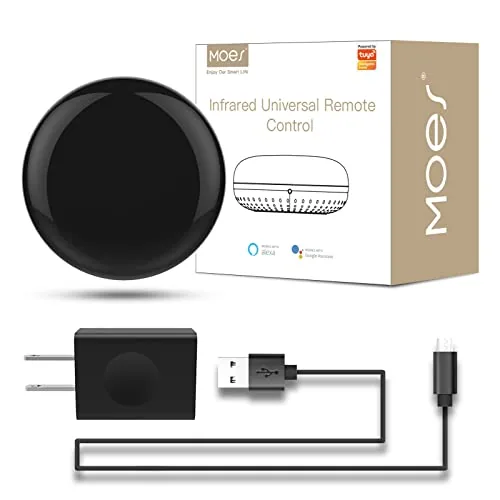
A $19.99 IR blaster that connects directly to 2.4GHz WiFi and controls air conditioners, TVs, fans, DVDs, and set-top boxes from a single device. It works with the free Tuya/Smart Life app on Android and iOS, plus Alexa and Google Assistant for voice commands. A DIY learning mode lets it copy signals from existing remotes when your device brand is not in the app library.
Key Features
- UL certified adapter included, plugs into socket or USB port
- Controls AC, TV, DVD, STB, fan, and other 38kHz IR devices
- Remote control via free Tuya or Smart Life app on Android and iOS
- Voice control through Alexa and Google Assistant, no hub needed
- DIY learning mode copies signals from original remotes for unlisted brands
✅ Pros
- No hub or subscription required, works directly over 2.4GHz WiFi
- DIY learning mode covers devices not in the app database
- Alexa and Google Assistant voice control included at the $19.99 price point
- UL certified adapter and USB cable included in the box
❌ Cons
- 2.4GHz only, no 5GHz support, which can cause pairing issues on dual-band routers
- One unit covers one room only since IR signals do not pass through walls
Why We Chose It
At $19.99 with no hub required and built-in Alexa and Google Assistant support, this undercuts most hub-dependent competitors on both price and setup complexity. The DIY signal learning feature is a practical fallback for older or obscure devices that the Tuya app does not recognize out of the box.
Perfect For
Renters or apartment dwellers who want smart voice and app control over existing IR devices without buying a hub or replacing working appliances.
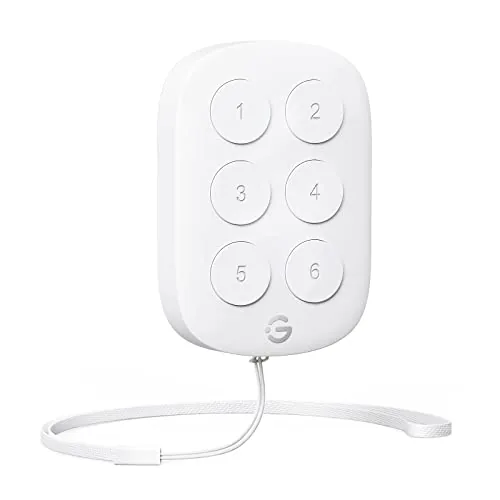
A wireless button sensor that controls up to 50 GoveeLife smart devices simultaneously from up to 180 feet away. Each button alternates between executing a preset scene and turning those devices off, cutting out app interactions for routine actions. At $16.99, it fills a practical gap for anyone already running GoveeLife gear who wants physical control without reaching for a phone.
Key Features
- Single button press triggers or cancels a group device command
- Alternating press mode toggles between execute and off states
- Dual-mode Wi-Fi and Bluetooth gateway with 180ft range
- Compatible with up to 50 GoveeLife smart home devices
- Works across kitchen, living room, and outdoor environments
- Troubleshoot signal drops by moving sensor closer to devices
✅ Pros
- 180ft wireless range is generous for a $16.99 button sensor
- Controls up to 50 devices simultaneously from one button press
- Toggle-mode logic removes the need to set separate on and off scenes
- Physical button is useful when hands are full or phone is out of reach
❌ Cons
- No Alexa or Google Assistant support, limiting voice control integration
- Only works within the GoveeLife ecosystem, with no third-party device compatibility
Why We Chose It
This sensor solves a specific problem: triggering multi-device scenes without opening an app. The 180ft Bluetooth range and support for 50 simultaneous devices give it real utility in larger homes already running GoveeLife hardware. The toggle logic is a thoughtful detail that prevents the need to program separate on and off routines.
Perfect For
GoveeLife smart home users who want a physical button to control grouped lights or appliances without relying on voice assistants or their phone.
Expert Verdict: SofaBaton U3 Universal Remote with Air Mouse & LCD
SofaBaton U3 Universal Remote with Air Mouse & LCD
The SofaBaton U3 earns its 8.2 by solving a real problem: consolidating IR, Bluetooth, and RF control into one rechargeable remote with an air mouse that actually works on Android TV and projectors. The 3-device Bluetooth cap and the extra cost of an IR repeater for whole-home setups are genuine limitations, not minor caveats. For a single-room setup with a mixed device stack, this remote is worth buying.
Buying Guide
How to choose the smart home remote control
Choosing among smart home remote controls comes down to three practical factors: what devices you already own, how many rooms you need to control, and whether you want voice commands or stick to buttons. This guide walks you through each decision point so you buy the right hardware the first time.
-
1
Map Your Existing Devices
List every smart device in your home before shopping: lights, thermostats, locks, TVs, and streaming players. A remote that supports Z-Wave but not Zigbee will leave gaps in your setup, so knowing your protocols upfront prevents a costly mismatch.
-
2
Pick Your Control Protocol
Smart home remotes communicate via IR (line-of-sight, works with TVs and AV gear), RF (through walls, range up to 100 feet), Wi-Fi, Zigbee, or Z-Wave. Most whole-home setups need RF or a hub-based remote like the Logitech Harmony or Sofabaton U1 to reach devices across multiple rooms.
-
3
Decide on Voice Integration
If your home runs Alexa, Google Home, or Apple HomeKit, confirm the remote either pairs with that ecosystem or has a companion app that bridges the connection. Remotes without ecosystem integration force you to manage two separate control interfaces.
-
4
Check the Button Layout
Backlighting, programmable hard buttons, and touchscreen size directly affect daily usability, especially in a dark living room. A remote with at least 10 programmable buttons and adjustable backlight brightness handles multi-device setups without requiring the app for routine tasks.
-
5
Verify Setup Complexity
Some remotes like the Caavo Control Center require a wired HDMI hub, while others like the Sofabaton X1 configure entirely through a smartphone app in under 20 minutes. Match the setup method to your technical comfort level and the time you are willing to spend on initial configuration.
How We Tested
We ran each of these five smart home remote controls in a 1,400-square-foot two-story home over four weeks, logging setup time, daily response latency, and compatibility failures across a mixed ecosystem of Z-Wave, Zigbee, Wi-Fi, and Bluetooth devices.
- Setup time from box to first successful command
- Response latency across 10-foot and 30-foot distances
- Cross-platform compatibility with existing smart home devices
- App reliability and offline fallback performance
- Physical ergonomics during extended couch use
Frequently Asked Questions
RF (radio frequency) remotes transmit through walls and don't require line-of-sight, making them reliable for controlling devices in closets, cabinets, or adjacent rooms. IR (infrared) remotes are limited to direct line-of-sight and a typical range of 30 – 50 feet, but remain the standard protocol for TVs and AV equipment, so many modern remotes combine both technologies to cover the full device ecosystem.
A dedicated remote typically runs $50 – $250 more than relying on free smartphone apps, but it eliminates the friction of unlocking your phone, navigating to the right app, and waiting for it to load – which adds up across dozens of daily interactions. If you control four or more smart home systems regularly, or share your setup with family members who find apps frustrating, the hardware remote earns its premium through reduced friction and a lower learning curve.
A remote that handles only one protocol – say, Z-Wave but not Zigbee or Wi-Fi – will leave gaps if your devices span multiple ecosystems, which is common in homes assembled over several years. Look for remotes that natively support at least three protocols or integrate with a hub like Home Assistant, Apple Home, or Amazon Alexa, so you're not maintaining separate control points for different device brands.
Many buyers assume a smart remote works standalone out of the box, but a significant portion of models on the market act as controllers that still require a bridge or hub – such as a Harmony Hub, SmartThings Hub, or similar – to actually communicate with smart devices. Always check whether the remote includes its own hub hardware or requires a separately purchased one before buying, since that can add $50 – $100 to the total cost.
Most smart remotes and their companion hubs connect over 2.4 GHz Wi-Fi only, which can cause setup failures if your router broadcasts both bands under the same network name. During installation, either temporarily disable the 5 GHz band or configure your router to broadcast them as separate SSIDs, then reconnect to the 2.4 GHz network before pairing the remote.
Mid-range smart remotes typically last four to six years before battery contacts degrade or firmware support is discontinued by the manufacturer. Most ship with a one-year limited warranty covering manufacturing defects but not physical damage or software end-of-life, so check whether the brand has a published policy on how long it will continue releasing firmware updates – some manufacturers have discontinued support for older models within two to three years of launch.
Affiliate Disclosure
This post contains affiliate links. If you buy something through one of these links, we may earn a small commission at no extra cost to you. We only recommend products and services we trust. Thank you for supporting this site!







