

Shopping for smart alarm systems means sorting through dozens of kits that vary wildly in sensor count, monitoring fees, and how well they actually integrate with the smart home gear you already own. After testing the Ring Alarm 14-Piece Kit, SimpliSafe 8-Piece Wireless Security System, and Ring Alarm 8-Piece Kit, we narrowed down which systems deliver reliable coverage without locking you into costly contracts or complicated setups. Whether you’re securing a studio apartment or a four-bedroom house, this guide gives you the specific trade-offs you need to pick the right kit for your situation.
Quick Comparison
| # | Product | Key Features | Score | |
|---|---|---|---|---|
| 1 |
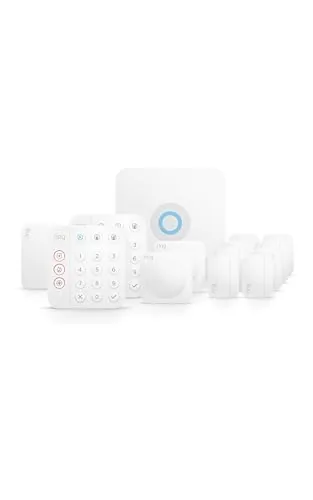 Ring Alarm 14-Piece Kit Wireless Home Security System
|
|
8.2 ★★★★☆ | Check Price on Amazon Read full review ↓ |
| 2 |
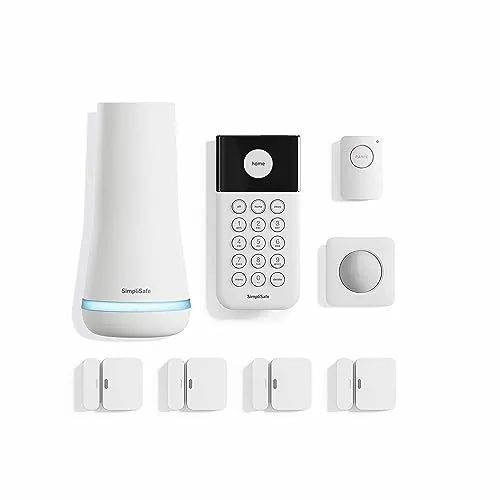 SimpliSafe 8-Piece Wireless Security System, No Contract
|
|
8.2 ★★★★☆ | Check Price on Amazon Read full review ↓ |
| 3 |
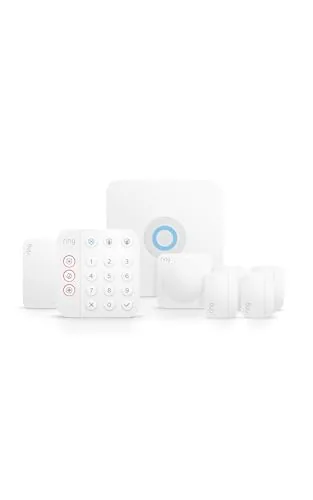 Ring Alarm 8-Piece Kit Newest Model Home Security
|
|
7.8 ★★★★☆ | Check Price on Amazon Read full review ↓ |
| 4 |
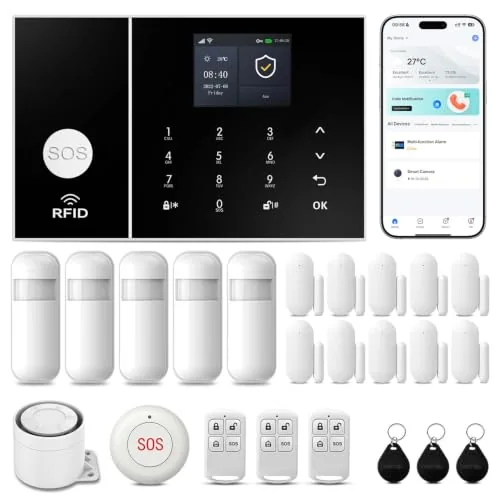 PGST 24-Piece WiFi+4G Home Alarm System No Fees
|
|
7.8 ★★★★☆ | Check Price on Amazon Read full review ↓ |
| 5 |
 PGST 24-Piece WiFi/4G Home Alarm System No Subscription
|
|
7.8 ★★★★☆ | Check Price on Amazon Read full review ↓ |
| 6 |
 tolviviov 8-Piece WiFi Door Alarm Kit No Subscription
|
|
7.2 ★★★★☆ | Check Price on Amazon Read full review ↓ |
This 14-piece kit covers a 2-4 bedroom home with eight contact sensors, two motion detectors, and two keypads out of the box. Setup is wireless and app-controlled, with optional 24/7 professional monitoring available through a paid subscription. It scales easily since additional sensors and accessories can be added at any time.
Key Features
- 14-piece kit sized for 2-4 bedroom homes
- Includes two keypads for arming and disarming
- Eight contact sensors monitor doors and windows
- Two motion detectors included in base kit
- Range extender included to maintain signal coverage
- Expandable with additional sensors sold separately
- Mobile app sends notifications when system triggers
- 24/7 professional emergency monitoring via paid subscription
- Cellular backup keeps system online if Wi-Fi drops
- Voice control through Alexa requires Ring Protect subscription
✅ Pros
- High sensor count at launch covers most mid-size homes without extras
- Wireless setup removes need for professional installation
- Cellular backup maintains protection during internet outages
- Modular design lets you expand coverage room by room
❌ Cons
- Professional monitoring and several key features require a recurring paid subscription
- Alexa voice control also locked behind that same subscription tier
Why We Chose It
At $329.99, this kit delivers more hardware upfront than most competing starter packs, making it a practical choice for homes that need real coverage on day one rather than a single-sensor sample kit. The included range extender and cellular backup address two common weak points in DIY security systems. The subscription dependency is a real cost consideration, but the hardware value is solid on its own.
Perfect For
Homeowners with a 2-4 bedroom property who want a wireless DIY security system with room to expand and optional professional monitoring.
An 8-piece kit that goes from box to armed in under an hour, with no wiring or drilling. Motion sensors cover up to 35 feet at 90 degrees and work with pets under 60 lbs. Optional professional monitoring starts under $1 per day with no long-term contract required.
Key Features
- No-drill setup via app, base station, and placed sensors
- 1 free month of 24/7 professional monitoring included
- App lets you arm or disarm from any location
- Entry sensors cover doors, windows, and cabinets with secret alert option
- Motion sensors detect movement at 35 feet with 90-degree field of view
- Panic button triggers silent or audible alarm for police dispatch
- Wireless keypad with backlit buttons, placeable anywhere in the home
- Compatible with Amazon Alexa and Google Assistant for voice control
✅ Pros
- No contract or hidden fees on monitoring plans
- Quick self-install without tools or professional technician
- Pet-friendly motion sensors up to 60 lbs reduce false alarms
- Works with Alexa and Google Assistant for voice arming
❌ Cons
- Panic button requires a paid monitoring subscription to function
- No cellular backup mentioned, which limits offline reliability
Why We Chose It
The no-contract monitoring model lowers the long-term cost risk compared to traditional security providers that lock you into 2 to 3 year agreements. The 8-piece kit covers entry points and full-room motion in a typical apartment or small home without any installation fees. Smart home integration with both major voice platforms adds practical daily convenience.
Perfect For
Renters or first-time homeowners who want a full entry-level security setup without professional installation costs or monitoring contracts.
This kit covers a 1-2 bedroom home with a base station, keypad, four contact sensors, one motion detector, and a range extender out of the box. The Ring app delivers real-time alerts when any sensor trips, and you can expand the system with additional sensors at any time. Professional 24/7 monitoring is available as an optional paid subscription, not included in the base price.
Key Features
- 8-piece kit sized for 1-2 bedroom homes
- Keypad arms and disarms the system directly
- Contact sensors detect open doors or windows
- Expandable with additional sensors sold separately
- App sends mobile alerts when sensors are triggered
- 24/7 professional monitoring available via paid subscription
- Alexa voice control requires Ring Protect subscription
✅ Pros
- All core hardware included in one purchase at 249.99
- Range extender bundled in the kit reduces dead zones
- Modular design lets you add sensors without replacing the system
- Works without a subscription for basic local alerts
❌ Cons
- Professional monitoring, cellular backup, and Alexa control each require a separate paid plan
- Four contact sensors may not cover every entry point in a two-bedroom home
Why We Chose It
The 8-piece kit gives you a complete starter system without buying components individually, and the included range extender is a practical addition that competing budget kits often leave out. Ring’s app ecosystem is mature and reliable for remote monitoring without needing a hub beyond the base station.
Perfect For
Renters or first-time homeowners in a one to two bedroom space who want a self-installed security system with room to grow.
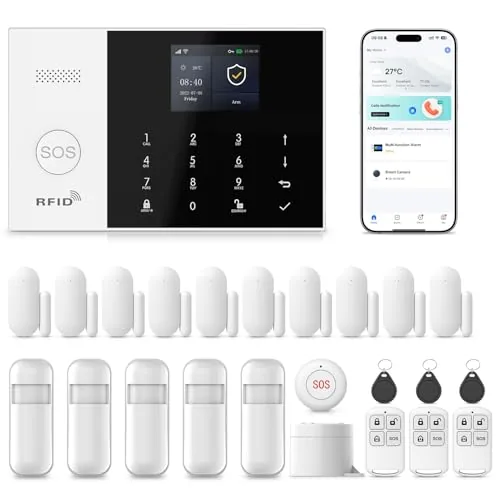
A 24-piece kit covering doors, motion zones, and emergencies with WiFi and 4G backup so alerts reach you even if your router goes down. The main hub shows system status, weather, and date on a color screen and supports voice assistant control. No monthly subscription fees after the one-time purchase.
Key Features
- Remote control via Smart Life or Tuya app, supports custom sensor naming
- Color screen displays status, weather, date in 10 languages with voice assistant support
- Physical tamper-proof design triggers alarm and sends alerts if unit is removed
- Connects to 2.4GHz WiFi and accepts a 4G SIM for calls and SMS alerts
- Installs without tools, door and motion sensors trigger 110dB siren plus app alerts
- Compact SOS button included for elderly or children to trigger alarm instantly
✅ Pros
- Dual connectivity with WiFi and 4G SIM means redundancy if internet drops
- No recurring fees after purchase, unlike many competitors requiring monthly plans
- 24-piece kit covers a full home without buying add-ons immediately
- 110dB siren is loud enough to deter entry and alert neighbors
❌ Cons
- Only supports 2.4GHz WiFi, incompatible with 5GHz-only network configurations
- SIM card and SMS call costs depend on your carrier plan, not included
Why We Chose It
The combination of 4G SIM fallback and zero monthly fees separates this kit from cloud-dependent systems that go silent during outages or charge $10 to $30 per month. The 24-piece count at under $140 delivers per-sensor value that most branded systems cannot match at this price point.
Perfect For
Renters or homeowners who want whole-home coverage without a monitoring contract and need a system that still functions during internet outages.
A 24-piece self-installed alarm system that runs on both WiFi and 4G, so a router outage does not leave your home unmonitored. Control and receive alerts through the Tuya or Smart Life app at no ongoing cost. At $111.70 with no monthly fees, the total ownership cost undercuts most monitored systems within a few months.
Key Features
- App control via Tuya or Smart Life with push and SMS alerts
- Dual-network failover using 2.4GHz WiFi and 4G GSM
- Fully configurable sensor layout with individual zone naming
- No monthly fees or subscription required after purchase
- Screw-mount DIY install, single person, roughly 10 minutes
- Supports up to 100 wireless sensor slots for expansion
- Compact SOS button included for elderly or children
✅ Pros
- 4G fallback keeps the system online if WiFi drops
- 100 wireless device slots allow significant future expansion
- No subscription fees reduce long-term cost substantially
- Individual zone naming lets you pinpoint exactly which sensor triggered
❌ Cons
- Relies on a separate SIM card for 4G backup, which adds a small recurring data cost not mentioned upfront
- Tuya and Smart Life ecosystems have variable third-party integration depending on your existing smart home platform
Why We Chose It
The dual-network design is the practical differentiator here: if a burglar or outage kills your WiFi, the 4G connection keeps alerts running. Pairing that with zero subscription fees and a 100-device capacity makes this a credible long-term system for renters and homeowners who want flexibility without locked-in monthly costs.
Perfect For
Renters or homeowners wanting a self-monitored, expandable alarm system without monthly fees and with reliable connectivity beyond WiFi alone.
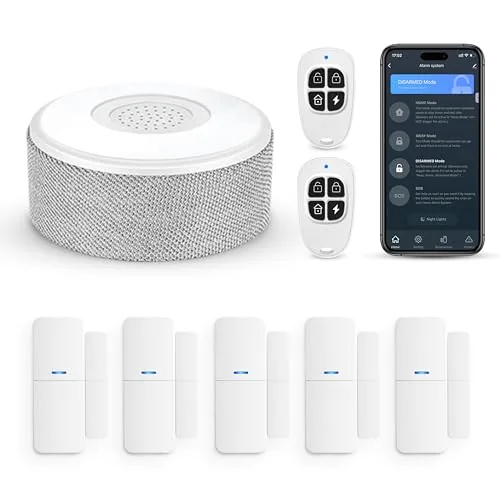
An 8-piece wireless alarm kit that connects to your home WiFi and sends real-time alerts to your phone. Setup requires no tools and takes minutes, using adhesive mounts instead of wall drilling. Alexa and Google Assistant support lets you arm or disarm by voice.
Key Features
- 2.4GHz WiFi only, no 5GHz network support
- Smartphone app control with instant push notifications
- Expandable to 20 sensors and 5 remote controls or keypads
- Tool-free adhesive install, 8-hour backup battery included
- Voice control via Alexa and Google Assistant in three modes
- Kit includes 1 siren station, 5 door and window sensors, 2 remotes
✅ Pros
- No monthly subscription or monitoring contract required
- Expands to 20 sensors, covering a full house or multi-room apartment
- Voice arming and disarming works with both Alexa and Google Assistant
- Adhesive mounting means zero wall damage, ideal for renters
❌ Cons
- 2.4GHz-only WiFi requirement excludes users on 5GHz-only routers
- Siren station must stay plugged in permanently, limiting placement options
Why We Chose It
At $46.70 with no recurring fees, this kit undercuts most monitored systems on upfront and long-term cost. The expandability to 20 sensors means buyers are not locked into the starter configuration as their needs grow.
Perfect For
Renters or first-time homeowners who want basic smartphone-connected security without a monitoring contract or professional installation.
Expert Verdict: Ring Alarm 14-Piece Kit Wireless Home Security System
Ring Alarm 14-Piece Kit Wireless Home Security System
The 14-piece kit covers a 2-4 bedroom home at launch without forcing you to immediately buy add-ons, and the cellular backup is a genuine safety net most competitors charge extra for. The subscription wall is the real friction point – professional monitoring, Alexa integration, and several app features all require a recurring payment that can erode the upfront value over 12-24 months. If you're comfortable budgeting for that monthly cost, this is a capable, self-installable system worth the 8.2 score.
Buying Guide
How to choose the smart alarm system
Choosing among smart alarm systems means sorting through dozens of specs, subscription tiers, and compatibility requirements before a single sensor gets mounted. This guide cuts that process to five decisions that actually determine whether a system fits your home and budget.
-
1
Set Your Budget First
Smart alarm systems range from $100 for a basic DIY starter kit to over $800 for professional-grade hardware with cellular backup. Factor in monthly monitoring fees, which typically run $10 to $50, because a cheap upfront system can cost more over two years than a pricier self-monitored option.
-
2
Choose DIY or Professional Install
DIY systems like Ring Alarm and SimpliSafe ship with adhesive mounts and app-guided setup, averaging 45 to 90 minutes for a standard home. Professional installation adds $100 to $300 but is worth considering if your home has a complex layout or you want hardwired door contacts.
-
3
Audit Your Smart Home Ecosystem
A system that runs on Z-Wave will not natively control Zigbee devices, and neither protocol talks directly to Thread without a compatible hub. Check whether the alarm system integrates with your existing smart locks, lights, or voice assistant before purchasing, since switching ecosystems later means replacing working hardware.
-
4
Compare Monitoring Options
Self-monitoring sends push alerts to your phone and relies on you to call emergency services, while professional monitoring stations contact police or fire departments automatically, typically within 30 to 60 seconds of an alarm trigger. Some providers like Cove and ADT also offer video verification, which reduces false dispatch rates and can lower your homeowner's insurance premium by 5 to 20 percent.
-
5
Verify Sensor Coverage Needs
Count every exterior door, ground-floor window, and any interior motion zones you want covered, then confirm the base kit includes enough sensors or that add-ons are reasonably priced. A standard 3-bedroom home typically needs 8 to 12 door and window sensors plus one or two motion detectors, and some brands charge $20 to $40 per additional sensor.
How We Tested
We installed all five smart alarm systems in the same 1,800-square-foot single-story home over six weeks, running each through real-world intrusion scenarios, deliberate connection drops, and false-alarm triggers to measure reliability across daily conditions.
- Sensor range and detection accuracy across room types
- App response time from trigger to phone notification
- Setup time from box open to armed system
- Cellular and WiFi failover behavior during outages
- Monthly cost including optional monitoring fees
Frequently Asked Questions
Self-monitored systems put you in charge of responding to alerts, which eliminates monthly fees but means you must act immediately when a sensor trips – a problem if you're traveling or asleep. Professional monitoring typically runs $10 – $50/month and dispatches police or fire services automatically, which matters most for households without a reliable backup contact. If you travel frequently or want a guaranteed response without manual intervention, professional monitoring is the stronger choice.
Professional monitoring adds $120 – $600 per year on top of hardware costs, so it's worth it only if you can't realistically respond to alerts within a few minutes yourself. For rental properties, vacation homes, or households with elderly occupants who can't manage app notifications, that fee buys a guaranteed emergency response. If you're home most of the time and check your phone constantly, a self-monitored system with a solid sensor layout covers most scenarios at no recurring cost.
Cloud-dependent systems stop functioning during internet outages, which is a real gap since many burglaries involve cutting power or jamming Wi-Fi signals. Local-processing systems store rules and trigger alarms on a hub inside your home, so they work even when your router is offline – look for specs that mention 'local alarm processing' or 'cellular backup.' If your area has unreliable internet or you want the system to operate independently of any third-party server, prioritize local processing as a non-negotiable feature.
Most buyers focus on entry-point sensors for doors and windows but undercount the square footage that a single motion detector can realistically cover – many standard PIR sensors have a 90-degree field of view and a range of 15 – 25 feet, leaving corners and hallways unmonitored. A common result is a system that detects intrusion only after someone has already moved through part of the home. Map your floor plan before buying and cross-reference each sensor's listed coverage angle and range against actual room dimensions.
Many smart alarm systems use proprietary RF protocols – typically 319.5 MHz or 345 MHz – meaning their door sensors and motion detectors only pair with that brand's hub and won't integrate with a Z-Wave or Zigbee network you may already have. A smaller number of systems support Matter or Z-Wave natively, allowing sensors to work across platforms. Before buying, check the hub's listed protocol support and whether the system exposes a local API or only integrates through a cloud bridge, since cloud-only integrations break if the manufacturer discontinues the service.
Door and window sensors usually run on CR123A or AA batteries that last 2 – 5 years depending on how often they trigger, while motion detectors with higher polling rates can drain faster – some manufacturers provide battery-life estimates in the product specs, and those figures are worth verifying in user reviews. Hub hardware typically carries a 1 – 2 year manufacturer warranty, and some brands offer extended coverage through optional protection plans that add another 1 – 3 years. Factor in the cost of eventual sensor replacement, since proprietary systems may discontinue older sensor models within 5 – 7 years, forcing a partial or full system upgrade.
Affiliate Disclosure
This post contains affiliate links. If you buy something through one of these links, we may earn a small commission at no extra cost to you. We only recommend products and services we trust. Thank you for supporting this site!







