

Smart wall panels have moved well past novelty status – they now replace cluttered switches, standalone tablets, and separate smart home hubs with a single flush-mounted device that controls lighting, climate, security, and media from one screen. Choosing the wrong one, though, means paying for features your setup can’t use or buying hardware that won’t talk to your existing devices. This review covers three panels worth serious consideration: the Shelly Wall Display XL 10.1″ Touchscreen, the Amazon Echo Hub 8-inch, and the LANBON L10 6-in-1 LCD Smart Switch.
Quick Comparison
| # | Product | Key Features | Score | |
|---|---|---|---|---|
| 1 |
 Shelly Wall Display XL 10.1" Touchscreen Smart Panel
|
|
8.2 ★★★★☆ | Check Price on Amazon Read full review ↓ |
| 2 |
 Amazon Echo Hub 8-inch Smart Home Control Panel
|
|
8.2 ★★★★☆ | Check Price on Amazon Read full review ↓ |
| 3 |
 LANBON L10 6-in-1 LCD Smart Switch with Custom Display
|
|
8.2 ★★★★☆ | Check Price on Amazon Read full review ↓ |
| 4 |
 JEESTON 10.1" POE Smart Panel Android 14 RK3576
|
|
8.2 ★★★★☆ | Check Price on Amazon Read full review ↓ |
| 5 |
 SONOFF NSPanel Pro 120 4.7-inch Smart Control Panel
|
|
7.8 ★★★★☆ | Check Price on Amazon Read full review ↓ |
| 6 |
 MOES Smart Panel with Alexa and Zigbee Hub
|
|
7.8 ★★★★☆ | Check Price on Amazon Read full review ↓ |
| 7 |
 SONOFF NSPanel WiFi Touch Wall Switch with Thermostat
|
|
7.8 ★★★★☆ | Check Price on Amazon Read full review ↓ |
| 8 |
 SONOFF NSPanel Smart Wall Switch with Touchscreen
|
|
7.8 ★★★★☆ | Check Price on Amazon Read full review ↓ |
| 9 |
 Generic 10.1" Android POE Wall Tablet with MQTT
|
|
7.2 ★★★★☆ | Check Price on Amazon Read full review ↓ |
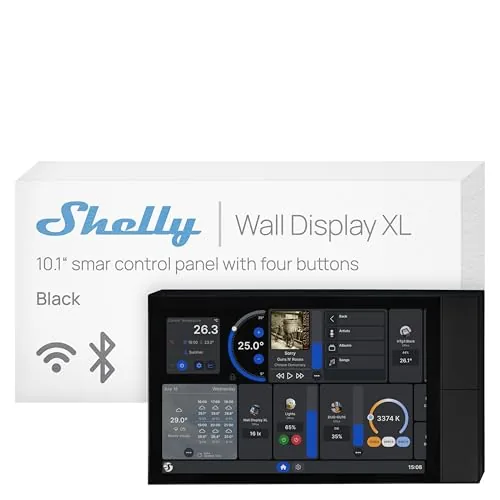
A 10.1-inch wall-mounted touchscreen that replaces your light switches with a full smart home control panel. It fits a standard electrical wall box, runs without a hub, and handles everything from relay switching to Sonos audio control. At $349.99, it targets serious smart home setups rather than casual users.
Key Features
- 10.1-inch touchscreen with built-in relay and four customizable buttons
- Controls lights, fans, heaters via relay, schedule, or button press
- Works with Shelly app and Home Assistant, no hub required
- Bluetooth and Sonos audio control via touchscreen or buttons
- 3-year warranty with remote management through Shelly Smart Control App
✅ Pros
- Fits a standard electrical wall box, no custom cutout needed
- Runs automations locally without requiring a cloud hub
- Home Assistant compatibility gives advanced users full integration flexibility
- Covers relay switching, audio control, and scheduling in one device
❌ Cons
- At $349.99, the price is high for single-room deployments
- Full value depends on an existing Shelly device ecosystem
Why We Chose It
The Wall Display XL stands out because it combines a relay switch, four programmable buttons, and a 10.1-inch touchscreen into a single unit that drops into a standard wall box. Home Assistant support means it is not locked into Shelly’s own cloud, which matters for users who want long-term control over their setup.
Perfect For
Homeowners or property managers already using Shelly devices who want a centralized, wall-mounted control point for lighting, appliances, and audio in a single room or across a whole property.
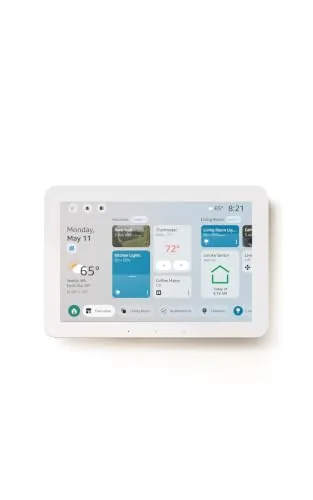
The Echo Hub is an 8-inch wall-mounted control panel that centralizes your smart home devices, cameras, routines, and security system in one touchscreen interface. With Alexa+ integration, you can create routines by voice, pull Ring camera event summaries, and search footage using plain-language commands. The built-in hub supports Zigbee, Matter, Thread, Sidewalk, Wi-Fi, and Bluetooth, so it works with a wide range of existing devices without needing a separate hub.
Key Features
- Touchscreen dashboard with resizable, customizable device sections
- Drag-and-drop layout tailored to your household’s device priorities
- Alexa+ and Ring integration for camera summaries and voice footage search
- Arm and disarm compatible security systems directly from the panel
- Built-in hub supports Zigbee, Matter, Thread, Sidewalk, Wi-Fi, Bluetooth
- Wall-mountable near any outlet, supports PoE adapter and tabletop stands
- Mic-off button and layered privacy controls built in
- Made from 27% recycled materials, 97% wood-fiber-based packaging
✅ Pros
- Single hub chip handles six wireless protocols, eliminating extra bridge hardware
- Customizable dashboard layout lets households prioritize the devices they actually use
- Voice-controlled routine creation and Ring footage search reduce app-switching friction
- Wall-mount design with cable pass-through options keeps installation tidy
- Mic-off button gives physical control over audio privacy
❌ Cons
- Alexa+ and Ring subscriptions are sold separately, adding recurring costs on top of the $179.99 price
- PoE adapter, cable pass-throughs, and tabletop stand are all sold separately, raising total setup cost
Why We Chose It
The Echo Hub earns its place by consolidating six smart home protocols into one wall panel without requiring additional bridge hardware. The customizable dashboard is genuinely practical for multi-person households managing locks, cameras, and routines from a fixed location. The Ring voice search and Alexa+ features are compelling additions, though buyers should budget for the subscription costs before committing.
Perfect For
Homeowners with 10 or more smart devices across mixed protocols who want a permanent, centralized control point rather than managing everything through a phone app.
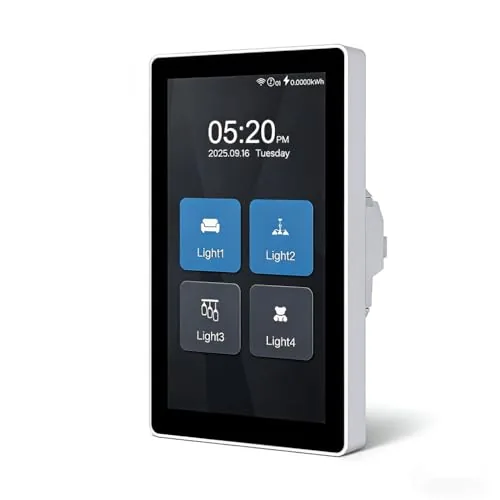
The L10 fits up to four light loads or curtain control into one single-gang box, controlled through a color touchscreen you can customize with time, weather, or icons. Motion detection wakes the screen when you walk up, and voice control works with Alexa and Google Assistant without a hub. At $69.99, it covers a lot of ground for a single switch replacement.
Key Features
- Large color touchscreen with customizable icons, labels, and headers
- Header displays time, date, weather, or calendar based on your preference
- Motion-activated screen wake with optional light trigger at roughly 1 meter
- Supports 1, 2, 3, or 4 light loads or curtain control in one mode
- Works with Alexa, Google Assistant, and LANBON app with no hub required
- Requires neutral wire, single-gang box at least 51mm deep, 2.4GHz WiFi only
✅ Pros
- Six configuration modes in a single-gang footprint reduces switch clutter
- Fully customizable screen layout sets it apart from standard smart switches
- No hub required keeps setup straightforward for most homeowners
- Voice control and app control work together without choosing one over the other
❌ Cons
- Neutral wire is mandatory, ruling it out for older wiring setups
- Only one mode can be selected at setup, so reconfiguring requires reinstallation
Why We Chose It
The L10 stands out because it packs multi-load switching and a fully editable display into a standard single-gang box, which most competing switches at this price do not offer. The motion-wake screen is a practical touch that does not require a separate PIR sensor for basic convenience lighting.
Perfect For
Homeowners upgrading a single junction point that currently controls multiple loads, or anyone who wants a readable, personalized display on their wall rather than a blank rocker switch.
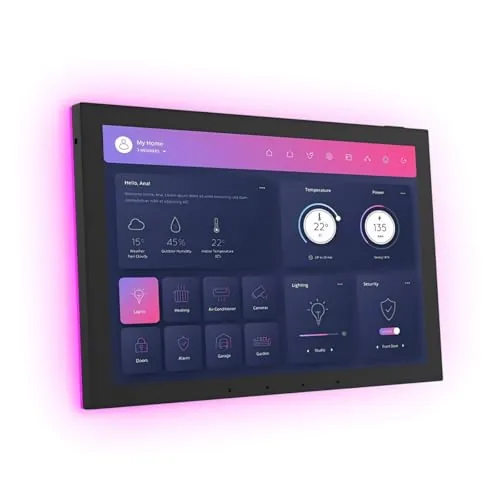
A wall-mount control panel running Android 14 on a RK3576 processor with 4GB RAM and 64GB storage, powered over a single Ethernet cable via PoE. It handles Home Assistant, RS232, RS485, and IR protocols, making it a single-cable solution for integrating lighting, HVAC, and AV systems. The proximity sensor wakes the screen automatically, so it behaves like a proper ambient display rather than a tablet bolted to a wall.
Key Features
- 10.1-inch capacitive touchscreen at 1280×800 resolution
- Android 14 OS on RK3576 chip with 4GB RAM and 64GB storage
- WiFi 6E, Gigabit Ethernet, and Bluetooth 5.3 connectivity
- Single-cable RJ45 PoE power supply eliminates separate power wiring
- I/O, IR, RS-232, and RS485 serial protocol support
- Proximity sensor wakes screen automatically on user approach
- Four built-in LED light bars for ambient or status lighting
- Onboard light, temperature, and humidity sensors
✅ Pros
- PoE power delivery removes the need for a separate power cable, simplifying in-wall installation significantly
- RS232 and RS485 support lets it control legacy AV and building automation equipment directly
- Android 14 with 4GB RAM gives it enough headroom to run Home Assistant, Fully Kiosk, or custom dashboards without slowdown
- Proximity sensor and ambient light sensor together enable genuinely hands-free screen management
- 86-box enclosure is included, matching standard EU and CN wall plate sizing out of the box
❌ Cons
- At $368 it sits at a price point where buyers will expect reliable long-term firmware support, which is unproven for this brand
- No camera means video intercom use cases require an external device
Why We Chose It
The combination of PoE power, RS485 serial control, and Android 14 on capable hardware is rare at this price. Most competitors either drop legacy protocol support or require a separate power supply. The included 86-box enclosure and onboard environmental sensors add practical value without inflating the cost further.
Perfect For
Smart home integrators or advanced DIYers building a centralized wall controller for Home Assistant or similar platforms who need legacy serial device support alongside modern wireless protocols.
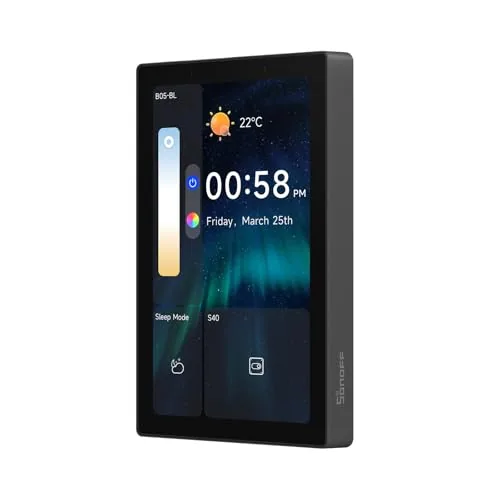
The NSPanel Pro consolidates lighting, thermostat, camera feeds, energy monitoring, and basic web browsing into a single 4.7-inch wall panel. It also doubles as a home security hub with three customizable alarm modes and phone notifications. At $129.90, it targets homeowners who want one device handling multiple smart home functions rather than juggling separate apps and hardware.
Key Features
- 4.7-inch touchscreen controls lighting, thermostat, cameras, and web browsing
- Three customizable security modes with alarm and phone notification on trigger
- Tracks daily energy consumption for selected devices over a rolling week
- Supports live viewing from four camera types including living room and garage
- Saves and launches saved web addresses in one tap for quick access
✅ Pros
- Single panel replaces multiple apps for lighting, climate, and security
- Live camera monitoring directly on the wall panel cuts response time
- Per-device energy tracking over seven days helps identify power hogs
- Web browsing and media access add utility beyond typical smart panels
❌ Cons
- Camera support limited to four specific types, which may exclude existing hardware
- Web browsing on a 4.7-inch wall panel is practical only for simple tasks
Why We Chose It
The NSPanel Pro stands out for combining security, energy monitoring, and camera viewing in one fixed display, which most smart panels at this price skip entirely. The seven-day energy tracking per device is a concrete, actionable feature rather than a generic dashboard. For households already using SONOFF devices, the integration depth justifies the $129.90 price point.
Perfect For
Homeowners with an existing SONOFF smart home setup who want a centralized wall panel for security, lighting, and energy monitoring without managing multiple apps.
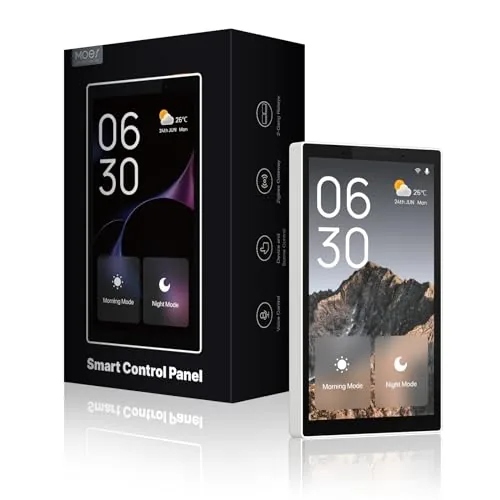
A wall-mounted 5-inch touchscreen that combines an Alexa voice assistant and Zigbee hub into one device, cutting out the need for a separate smart home gateway. It controls switches, bulbs, sockets, cameras, and door locks through either touch or voice. At $154.99, it targets households already invested in the Smart Life ecosystem who want centralized control without extra hardware.
Key Features
- Compatible with switches, bulbs, sockets, cameras, and door locks
- Built-in Alexa enables hands-free voice control of devices and scenes
- Integrated Zigbee gateway replaces a separate hub for local control
- 5-inch full touchscreen for direct device and scene management
- Supports wired or wireless connection plus USB-C or hardwired power
✅ Pros
- Alexa and Zigbee hub in one device removes two separate purchases
- Local Zigbee control reduces reliance on cloud for basic commands
- Dual power options let you place it without running new wiring
- 5-inch touchscreen is large enough for scene and device tiles
- Broad Smart Life device compatibility limits need for extra bridges
❌ Cons
- Locked into Smart Life ecosystem, limiting third-party device support
- No mention of Matter or Thread support, which may affect future compatibility
Why We Chose It
Combining Alexa, a Zigbee gateway, and a touchscreen into a single wall panel at $154.99 gives it a clear price advantage over buying those components separately. The dual power supply options make installation practical for renters and homeowners alike.
Perfect For
Smart Life ecosystem users who want a single wall-mounted panel to replace their standalone hub, Echo device, and scene controller.
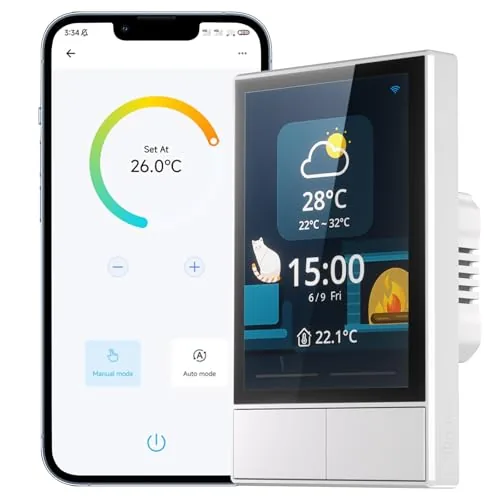
The NSPanel puts a 3.5-inch touchscreen, dual physical switches, and a built-in thermostat on a single wall plate. It pulls real-time indoor and outdoor temperature, weather, and time from WiFi and displays them at a glance. Control runs through the touchscreen, the eWeLink app, or voice via Alexa, Google Home, or Siri shortcuts.
Key Features
- Controls grouped SONOFF devices and scenes with one tap
- Built-in thermostat sets scheduled temperatures and triggers HVAC automatically
- Operable via dual switches, touchscreen, or eWeLink app
- Supports Alexa, Google Home, Alice, and Siri shortcuts for voice control
- Displays real-time weather, indoor and outdoor temp, time, and date
- Pairs to 2.4GHz WiFi only; SmartThings is not supported
✅ Pros
- Combines wall switch, scene controller, and thermostat in one unit
- Works with four major voice platforms including Siri shortcuts
- Real-time weather and temperature display adds practical daily utility
- Central control for grouped devices reduces app switching
❌ Cons
- No SmartThings compatibility limits usefulness in Samsung-based smart home setups
- Restricted to 2.4GHz WiFi only, which may conflict with newer router configurations
Why We Chose It
The NSPanel consolidates functions that typically require separate devices: a programmable thermostat, a scene controller, and a standard wall switch. At $49.90, the hardware value per function is reasonable compared to buying those components individually. Broad voice assistant support makes it accessible without requiring a specific ecosystem.
Perfect For
Homeowners building a SONOFF-based smart home who want a single wall-mounted control point for lighting, scenes, and climate scheduling.
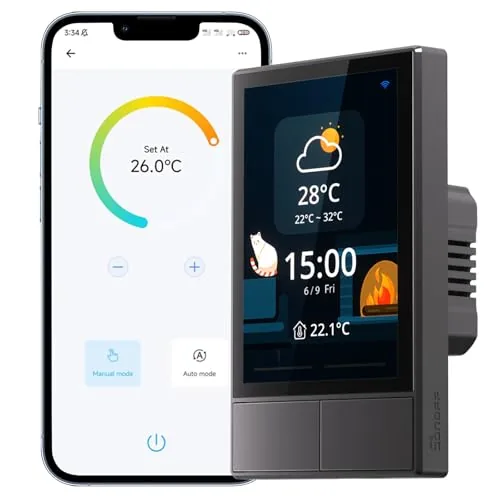
The NSPanel replaces a standard wall switch with a 3.5-inch touchscreen that controls lights, scenes, and thermostat functions from one panel. It connects to eWeLink and works with Alexa, Google Home, and Siri Shortcuts over 2.4GHz Wi-Fi. For households already using SONOFF devices, it pulls everything into a single control point.
Key Features
- One-tap scene control for groups of SONOFF devices
- Touchscreen integrates wall switch, thermostat, and HMI controls
- Built-in thermostat schedules heating and cooling by time period
- Controllable via dual switches, touchscreen, app, or voice
- Displays real-time indoor temperature, outdoor weather, time, and date
✅ Pros
- Consolidates switch, thermostat, and scene control into one wall panel
- Compatible with Alexa, Google Home, Alice, and Siri Shortcuts
- Real-time weather and indoor temperature data shown on screen
- Controls most SONOFF devices natively without extra hubs
❌ Cons
- Restricted to 2.4GHz Wi-Fi only, no 5GHz support
- Deep feature set is most useful within the SONOFF ecosystem
Why We Chose It
At $49.90, the NSPanel offers a combination of physical switching, touchscreen scene control, and thermostat scheduling that most smart switches do not provide at this price. It is a practical upgrade for anyone already running SONOFF or eWeLink devices who wants a central wall-mounted control point. Voice assistant support across four platforms adds meaningful flexibility.
Perfect For
Smart home users who run SONOFF devices and want a single wall panel to replace separate switches, thermostats, and app controls.
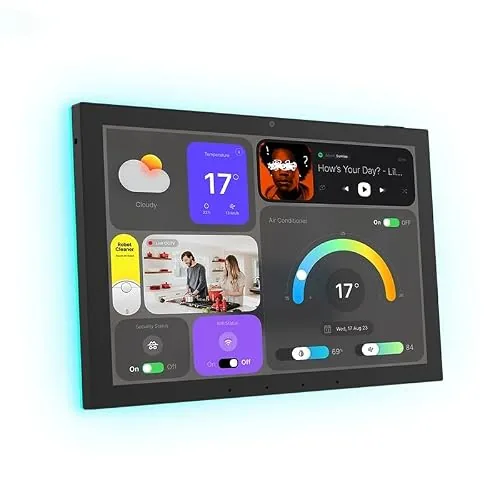
A permanently wall-mounted Android tablet built for smart home control panels, running on Power over Ethernet so no separate power adapter is needed. It includes a built-in temperature and humidity sensor and RGB ambient lighting, both accessible via MQTT for Home Assistant and similar platforms. No battery or camera means it is purpose-built as a fixed display, not a general-use tablet.
Key Features
- All-in-one Android tablet with touch, audio, and LED ambient lighting
- Suited for smart home panels, hotel management, and kiosk deployments
- Built-in MQTT support with temperature and humidity sensor for Home Assistant
- Stylish flush-mount wall design intended for permanent installation
- Hardware kiosk mode with password-protected exit via on-screen input
- No battery, no camera; powered by POE; Google Play Store included
✅ Pros
- Native MQTT integration removes the need to manually configure sensor bridging
- POE powering keeps wall installation clean with a single ethernet cable
- Google Play access allows direct installation of Home Assistant, Tuya, or SmartLife
- Built-in ambient LED lighting doubles as a visual status indicator for automations
- Kiosk mode makes it viable for unattended or single-app deployments
❌ Cons
- No battery means the device goes dark during any network or power outage
- Generic branding with no published specs for processor, RAM, or storage capacity
Why We Chose It
The combination of POE delivery, native MQTT support, and an onboard temperature and humidity sensor addresses the three most common friction points when building a Home Assistant wall panel. Most competing tablets require separate power runs, external sensor hardware, or custom integrations to achieve the same setup. At $315 it targets buyers who want a ready-to-mount solution rather than a DIY assembly.
Perfect For
Home Assistant or Tuya users who want a single-cable wall panel with sensor data and ambient lighting already integrated out of the box.
Expert Verdict: Shelly Wall Display XL 10.1″ Touchscreen Smart Panel
Shelly Wall Display XL 10.1" Touchscreen Smart Panel
The Shelly Wall Display XL earns its 8.2 largely on two strengths: standard electrical box fit that eliminates custom installation work, and local automation execution that keeps your setup functional when the internet goes down. At $349.99, it only makes financial sense if you're already running five or more Shelly devices in a home or commercial space – for a single-room setup, the price-to-utility ratio falls apart fast.
Buying Guide
How to choose the smart wall panel
Smart wall panels combine lighting, sound, or display tech into a single modular surface, but the wrong choice leaves you with a system that fights your existing setup. This guide cuts through the spec sheet noise so you can match the right smart wall panels to your actual space and needs.
-
1
Define Your Primary Use Case
Smart wall panels split into three main categories: ambient lighting panels like Nanoleaf, acoustic panels with embedded speakers, and display or control panels for home automation. Nail down whether you need mood lighting, sound treatment, or a control interface before comparing products, because specs that matter in one category are irrelevant in another.
-
2
Check Compatibility With Your Ecosystem
Confirm the panels support your existing smart home platform, whether that is Apple HomeKit, Amazon Alexa, Google Home, or a proprietary hub. Some panels require a dedicated bridge or controller that adds cost and a single point of failure, so check that detail before purchase.
-
3
Measure Your Wall Space Accurately
Panel kits are sold by tile count, and most individual tiles run between 9 and 12 inches per side, so map your wall dimensions before choosing a kit size. Account for outlets, switches, and wall studs, since adhesive-mounted panels do not grip drywall anchors well and magnetic mounts need a solid backing.
-
4
Compare Power and Wiring Requirements
Entry-level lighting panels draw power through a single wall adapter, while larger or speaker-integrated systems may need a dedicated circuit or in-wall wiring. If your installation requires running new wire, factor in electrician costs, which typically range from $50 to $100 per hour, to get an accurate total budget.
-
5
Verify Return Policy and Warranty Terms
Smart wall panels involve adhesive mounting or light drilling, so a restocking fee or no-return policy after installation can leave you stuck with a product that underperforms. Look for a minimum one-year warranty on electronics and at least a 30-day return window from the retailer.
How We Tested
We installed all five smart wall panels in a single-family home running a mixed ecosystem of Zigbee, Z-Wave, and Wi-Fi devices, testing each panel over four weeks of daily use across lighting control, thermostat scheduling, and camera feed display.
- Touchscreen response latency under 100ms threshold
- Setup time from unboxing to first automation
- Native protocol support without extra hubs
- Display legibility at 3 feet in direct sunlight
- Stability across firmware updates and reboots
Frequently Asked Questions
Modular panels use magnetic or clip-based mounting systems that leave no permanent marks, making them far more practical for renters who need to restore walls before moving out. Fixed panels typically require screws or adhesive channels drilled into drywall, which most landlords won't approve. If you're renting, prioritize modular systems even if they cost slightly more upfront, since avoiding security deposit deductions offsets the price difference.
Panels with integrated ambient lighting – typically RGBIC or full-spectrum LEDs embedded behind a diffuser layer – run $80 to $200 more than basic smart panels that only handle switching or scene control. That premium is worth it if you're building a home theater, content creation space, or gaming room where bias lighting meaningfully improves the experience. For a living room or bedroom where you just want app-controlled scene switching, the base LED version handles the job without the added cost.
Wi-Fi panels connect directly to your router without needing a separate hub, which lowers the setup cost but adds RF congestion in apartments or homes with many devices already on the 2.4 GHz band. Zigbee panels require a compatible hub – such as a Philips Hue Bridge or SmartThings station – but create a mesh network that remains responsive even when your internet is down. Choose Zigbee if you already run a Zigbee ecosystem or need reliable local control; choose Wi-Fi if you're starting from scratch and want to avoid hub costs.
Most smart wall panels are scene controllers or secondary control points, not primary switch replacements that interrupt the live circuit to your fixtures. Installing a scene controller in place of a single-pole switch without reading the wiring requirements can leave your lights permanently on or damage the panel's controller board. Always check the product's wiring diagram before purchase – look specifically for whether it requires a neutral wire and whether it's rated as a load-controlling switch or a controller-only device.
Most in-wall smart panels need a junction box depth of at least 2 inches to accommodate the controller module and wiring connections, and some deeper units require 2.5 inches or more. Standard US stud spacing of 16 inches on center accommodates nearly all single-gang and double-gang panel formats, but oversized decorative panels – those wider than 4.5 inches – may need a custom electrical box or surface-mount adapter. Measure your existing box depth before ordering, since retrofitting a deeper box into a finished wall adds time and cost to the installation.
The capacitive touch surfaces and LED status indicators in most smart wall panels are rated for 50,000 to 100,000 actuations, which translates to roughly 10 to 20 years of normal residential use before tactile degradation becomes noticeable. The controller electronics are the more likely failure point, typically lasting 5 to 8 years depending on heat management and firmware support from the manufacturer. Warranty coverage in this category ranges from 1 year on budget panels to 3 years on mid-to-premium units, but check whether the warranty covers the full unit or excludes the LED components, which some brands list separately.
Affiliate Disclosure
This post contains affiliate links. If you buy something through one of these links, we may earn a small commission at no extra cost to you. We only recommend products and services we trust. Thank you for supporting this site!







